Holiday Hack 2026 DMTF Objective

I haven’t attempted to match DMTF tones before, but I’m aware of what they are and I already had some decent audio software. The objective is to download the sound recording “Train Station Recording” from the Items menu after speaking to Shifty McShuffles. A hint is given “Some evidence never shows up by ear, however loud you turn it. Audio tools can show you a recording, not just play it.

For this I’m using Audacity and Friture, both are open source tools. I’m running Windows 11, so to pipe the audio from Audacity into Friture, I’ll be using Virtual Audio Cable, a tool that creates a virtual audio input and output in Windows, which makes it easy to pipe audio from one application into another. A must for Software Defined Radio enthusiest.

A note on Friture: This application creates a Spectrogram, which is used a lot in ARGs to find hidden images and words within sounds.

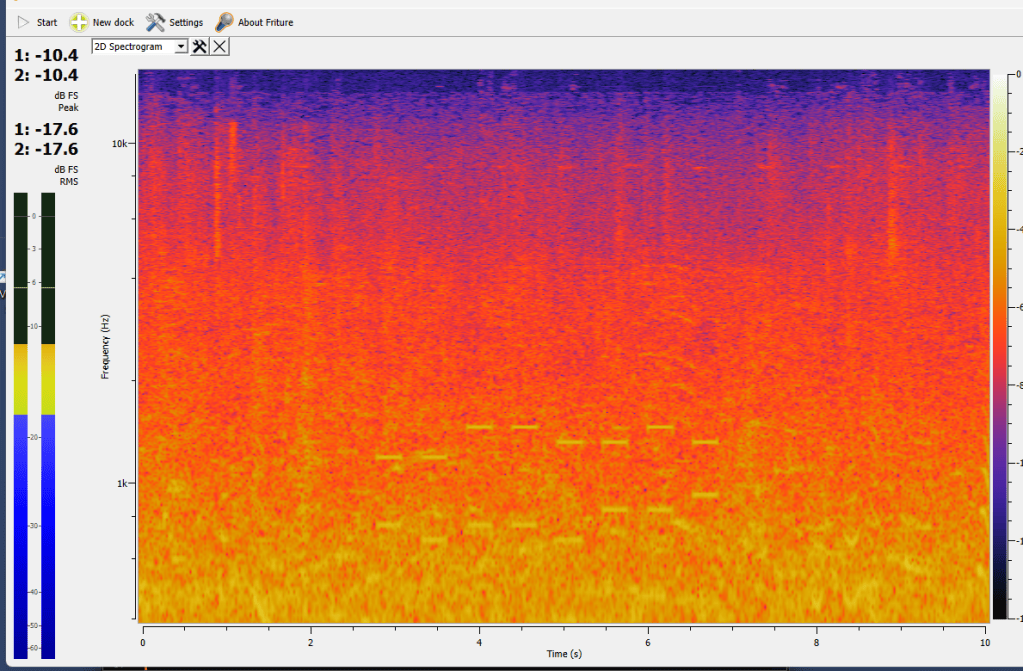
I played the audio file and waited to see if anything stood out. At some point you can hear a female voice, apparently on a phone and around 1 minute into the recording, you can hear the DMTF tones from the phone. When the tones ended I pressed “stop” in Friture and paused the recording. I also looked up DMTF on wikipedia so that I could get a chart of the frequencies associated with each tone.

DMTF tones: On touchtone (landline) phones, these are the tones you hear when you press a number. Each number (as well as * and #) have a unique tone which is a combination of two frequencies, one high and one low. The low frequencies range between 679Hz and 941Hz and the High frequencies range from 1209Hz to 1633Hz. Human ears can hear between 20Hz and 20kHz (20000Hz), so these tones fall around the midrange area of sound Below is a table of DMTF tone frequencies :

Key Low Frequency (Hz) High Frequency (Hz)
1 697 1209
2 697 1336
3 697 1477
4 770 1209
5 770 1336
6 770 1477
7 852 1209
8 852 1336
9 852 1477
* 941 1209
0 941 1336
#941 1477
A 697 1633
B 770 1633
C 852 1633
D 941 1633

My hypothesis is that I can match what I’m seeing in Friture with the tone table above.
Note the additional A,B,C, and D on the list, these are not common on landline phones, but are present and used by operators and technicians on landline phone networks. Another is the 2600Hz frequency which is famous in Phone Phreaking pre 1990 and used in combination with other tones to get free long distance and used in the famous “Blue Box”.

With the spectrogram stopped, I hovered my cursor over the top and bottom lines on the picture to get an accurate idea of what frequency was being heard. I created the table below, and matched them up the with closest frequencies in the DMTF tones table from above, and came up with the corresponding numbers

1197 758 4
1197 688 1
1468 754 6
1468 754 6
1325 684 2
1325 836 8
1468 839 9
1325 929 0

I entered 41662890 into the objective and Boom! Objective complete.
The achievement said “Eight digits, pulled out of a whole train stations worth of noise. Angel should really change her PIN.”

Conducting an Internal Audit for NIST 800-53: A Security Analyst’s Perspective

One of the most valuable exercises I’ve participated in is conducting an internal audit against NIST 800-53 controls. While external assessments often receive the most attention, a well-executed internal audit can uncover gaps, improve security posture, and significantly reduce the stress associated with formal assessments.

Internal audits are not just compliance checklists. They provide an opportunity to evaluate whether security controls are operating effectively, identify weaknesses before auditors do, and strengthen an organization’s overall cybersecurity program.

Understanding the Purpose of the Audit

Before beginning any assessment activities, it is important to understand the objective. NIST 800-53 provides a comprehensive catalog of security and privacy controls designed to protect information systems and organizations from a range of threats.

An internal audit should answer three key questions:

  • Are required controls implemented?
  • Are controls operating as intended?
  • Is there sufficient evidence to demonstrate compliance?

The goal is not to achieve a perfect score. The goal is to accurately assess the current state of the environment and develop a roadmap for improvement.

Defining the Scope

One of the first tasks I complete is defining the audit scope. Attempting to review every control simultaneously can be overwhelming, particularly in large or complex environments.

I typically begin by identifying:

  • Systems included in the authorization boundary
  • Applicable control baselines
  • External compliance requirements
  • Key stakeholders and system owners
  • Critical applications and supporting infrastructure

Having a well-defined scope helps ensure audit efforts remain focused and manageable.

Reviewing Security Documentation

Documentation is often the first area where auditors uncover deficiencies. Before reviewing technical implementations, I evaluate the organization’s security documentation to determine whether controls are adequately described.

Key artifacts typically include:

  • System Security Plan (SSP)
  • Policies and procedures
  • Risk assessments
  • Incident response plans
  • Configuration management plans
  • Contingency plans
  • Vulnerability management procedures

Throughout the review process, I verify that documentation reflects the actual environment. A well-written policy has little value if operational practices differ from what is documented.

Mapping Controls to Evidence

One of the most effective techniques I use is creating a control-to-evidence matrix. This document maps each applicable NIST 800-53 control to specific supporting evidence.

Examples include:

ControlEvidence
AC-2 Account ManagementUser account reviews, access requests, termination records
AU-6 Audit ReviewSIEM dashboards, log review reports
CM-6 Configuration SettingsSTIG checklists, configuration baselines
IR-4 Incident HandlingIncident reports, response procedures
RA-5 Vulnerability MonitoringScan reports, remediation tickets

This approach allows the audit team to quickly determine whether sufficient evidence exists for each control.

Performing Technical Validation

Documentation alone does not demonstrate compliance. Controls must also be validated through technical review and testing.

During technical validation, I focus on areas such as:

Access Control

  • User provisioning processes
  • Privileged account management
  • Multi-factor authentication
  • Account recertification reviews

Vulnerability Management

  • Authenticated vulnerability scans
  • Patch management effectiveness
  • Remediation timelines
  • Exception handling processes

Logging and Monitoring

  • Security event collection
  • Retention requirements
  • Alerting configurations
  • Incident investigation procedures

System Hardening

  • DISA STIG compliance
  • Secure baseline configurations
  • Configuration drift monitoring
  • Unauthorized software detection

The objective is to verify that controls are functioning consistently across the environment rather than relying solely on policy statements.

Interviewing Stakeholders

Another important component of an internal audit is engaging with system owners, administrators, engineers, and management personnel.

Control owners often provide context that documentation cannot capture. During interviews, I ask questions such as:

  • How is this control performed on a recurring basis?
  • What evidence is generated during execution?
  • How are exceptions approved and tracked?
  • What challenges exist in maintaining compliance?

These discussions frequently reveal process weaknesses, undocumented procedures, or opportunities for improvement.

Identifying Findings and Risks

As observations are collected, I categorize findings based on risk and impact.

Common findings include:

  • Incomplete documentation
  • Missing evidence
  • Unapproved configuration changes
  • Delayed vulnerability remediation
  • Inconsistent access reviews
  • Limited audit logging

Each finding should clearly describe:

  1. The control requirement.
  2. The observed condition.
  3. The associated risk.
  4. Recommended corrective actions.

Providing actionable recommendations helps stakeholders understand not only what is wrong but how to address it.

Developing Corrective Action Plans

An audit is only valuable if findings lead to improvement.

For each finding, I work with stakeholders to establish:

  • Remediation activities
  • Responsible personnel
  • Milestones and deadlines
  • Success criteria

Tracking corrective actions through completion demonstrates continuous monitoring and strengthens future assessments.

Lessons Learned

Over the years, I’ve learned that successful internal audits are less about compliance paperwork and more about operational effectiveness. The strongest security programs are not those with perfect documentation. Rather, they are the programs where documentation, processes, and technical implementations align.

An internal audit provides us with an opportunity to identify weaknesses proactively, improve security operations, and build confidence before external assessments occur. When approached as a continuous improvement exercise rather than a compliance burden, the audit process becomes a powerful tool for strengthening an organization’s cybersecurity posture.

Final Thoughts

Conducting an internal audit against NIST 800-53 requires preparation, collaboration, and technical expertise. As a security analyst, I view the process as an opportunity to validate security controls, reduce organizational risk, and support a culture of continuous improvement. Not to mention it’s a requirement.

The most effective audits combine documentation review, technical testing, stakeholder interviews, and evidence collection. When these elements come together, organizations gain a clear understanding of their security posture and are better prepared for both compliance assessments and real-world threats.

Finding Cyber Security Employment in 2026… good luck

Note: Apologies as this was originally written on my phone with no formatting.

In 2025 I was laid off from my position as a Cyber Security Engineer, along with about 20 others in various other IT positions. I spent the next 9 months looking for a job within the security field. Skip the next paragraph if your not interested in how or why I was laid off.

We worked for a large business and the network we managed internally was used for monitoring our Federal customers, and it was being decommissioned. In my six years of employment, we went from a small/medium size local business, to being acquired by a large federal and DoD contractor. Working internally my position would change from time to time, but I was always thankful that I wasn’t 100% on contract like the others, because they would eventually have to reapply, re-interview, and be rehired when those contracts were up. Little did I know that when the acquisition was complete, my internal work would be treated the same as a contract, and the decommissioned network would mean I would have to reapply, re-interview, and be rehired if I wanted to continue working for this employer. To be honest, the idea never crossed my mind. I had been beta testing the cloud environment that would eventually replace the network I had been working within for the last 6 years, and assumed my roll would just change. The issue was that DOGE had caused many of our contractors to loose their jobs a few months before, and caused stock price to not hit it’s intended mark. So when we got that our positions would no longer exist, there were not as many open positions as there had been in the past. I was put on leave without pay in September and after 3 failed interviews internally, I was laid off completely in November. I spent the next nine months searching for a job.

In 2023 and 2024 I was contacted multiple times by reciters offering me jobs. So when I lost my job, I didn’t believe it would take long to find a new one. I had went threw a few interviews over the years but was never willing to take the risk and work somewhere else, plus I liked my job and the people I worked with. So when I started actively looking for a new job after I got the news of the lay off, I was very concerned by the lack of progress I was making. I had 6 years of experience, in a FedRAMP networking, and working with federal agencies. I was experienced in Incident response, compliance, vulnerability management, internal audits and threat assessments, network forensics, log and packet analysis, and so on. I was administrator/system owner of 3 different security tools, I had trained SOC analysts, I had spoken in classrooms and participated in CTFs, and had several certs.. Despite all that, between September 2025 and June of 2026, I had submitted over 1400 applications, been about a dozen interviews, made it to 3rd round interviews 3 times, and was still getting rejected. Finally I found a job locally that opened up, which I start the week after writing this. Here are some things I’ve learned that aren’t blatantly obvious:

  1. The impact of AI on hiring.
    1. Sure you have heard that AI has become standard in the hiring process, but how much as it changed? After a few months of getting nowhere I decided to investigate how my resume stacked up against others. A job I had applied for was offering this. I had more than enough of the prerequisites for the job, if anything I was over qualified.. but I found that college students with no professional experience were in the 87%-95% match, while I was around 47%. I thought, “What the hell? how is that possible? They require at least 3 years of experience, these guys have none, and I have 6.. how are they a better match?” The answer was both a wake up call and extremely frustrating.. AI was being used to match the applicants based on this percentage, and probably unknown to the hiring team, AI isn’t great at this. My resume looked very similar to how it did in 2019, it was eye catching, it highlighted some of the biggest strengths, etc. I’ll go more into the resume details in the next bit, but lets just say that AI wasn’t good at understanding this. on the contrary, the college students at the top of the list were taking advantage of this. I couldn’t see their resumes myself, but I learned threw other channels that so much of this is dependent on how well AI understands the material, and what conclusions AI can draw from what it understands. A college student may not show that they have on the job experience in anything, but they might pull off showing a particular project they did in a class that looks like work experience to AI..
      This is something people need to keep in mind when apply, Don’t make your resume catch people’s attention, make it catch AI’s attention. What’s the best way to do that? The cheapest easiest answer I came up with was to ask AI to rewrite my resume so that AI could easily understand it.
  2. Make your resume like it’s 2026, not 2016.
    Basically take everything you ever heard about resumes and throw it out the window. If your applying for a local job at a small business where you know AI isn’t being used, then do it the way it’s always been done and keep that copy handy.. Otherwise here’s a few tips for AI to recognize your resume.
    1. Keep it plain and simple. One font only, something like Arial or Times New Roman are best, but Tahoma might also work.
    2. One font size, except for headings. You should honestly have two font sizes at most, your normal 10-12 and then slightly larger for the headings.
    3. No graphics, lines, emojis, wingdings, clip art, etc. Remember, keep it simple and plain.
    4. List the experience you have exactly as it’s listed in the job description. If your title of Cyber Security Analyst, but they are looking for a Cybersecurity Analyst, then write it exactly at it’s listed with no space.
      Those are the best tips for resumes I can possibly give that so many people do not yet understand. Chances are that no real person will ever look at your resume until the interview. Why is this? When your resume it submitted, AI will review it and parse out parts of your resume into either a spreadsheet or a database. When a recruiter looks at who the AI has chosen, they will usually look at the entries of the applicants in this parsed form and they will go down the list in each column and see which ones stand out. Why does this matter? If the AI can’t understand what it’s reading, either because of font type, size, or maybe the words mean the same but somehow didn’t make it into whatever LLM the AI is using, it wont get parsed. It’s as if whatever you wrote was left out completely.
      Make it plain, make the words match the description, and have multiple different AI agents proof read it. Most people have access to Copilot in Windows 11. There’s also several free AI services online such as Duck.AI, ChatGPT, and so on.
  3. Create a cover letter. When the recruiters go down the columns of hundreds of applicants trying to find what sticks out and what doesn’t, they will likely check to see if a cover letter is present. Personally I had AI generate a cover letter for me, mainly to understand what the layout should look like, and I kept that opened in a work doc all the time. Depending on the employer, I would change out certain parts of the cover letter to match that employer and the position I was applying for. Just get the basics. In most cases, it’s existence is more important than it’s content.
  4. Don’t rely on LinkedIn, GlassDoor, Zip Recruiter, Indeed, etc. I’m not saying you could avoid them entirely, but don’t make it your only option. Applying on these sites for remote jobs is like playing the lottery. If you do apply on them, try to be in the first 100 applicants.
    So if your not using a job site then what do you use? I learned this idea from a YouTube channel about job hunting and I expanded on it a bit.
    1. Come up with a list of businesses and organizations you would like to work for. If you can’t relocate, then try to add in any local businesses you can think of.
    2. Add at least one person you know from each of the businesses listed, that would be willing to refer you. A lot large businesses will pay $200-$1000 finders bonus to an employee that refers someone that ends up being hired. So getting permission isn’t hard, but getting to know people where you want to work is. If there’s an employer you would like to work at but don’t know anyone that works there, reach out on LinkedIn. make sure it’s someone in the same profession, look at any papers, blog posts, etc that they may have, and then reach out complimenting them and asking more information. Take some time to build repor. Wait until a position you want opens up at their employer, then ask them directly if they would be willing to refer you. Make it look like that wasn’t your intention all long.
    3. Take your list of employers and acquaintances employed with them, and find the careers site. It’s easiest to Google “(business name) job openings”. Bookmark the careers site and copy the URL to your list.
    4. Twice a week, go through your list and see if there are any openings and the businesses you chose. Have a resume and cover letter ready for each, and continue this routine, adding new businesses if you meet other people.

Why Vulnerability Scanning is limited in OT Environments

Why Vulnerability Scanning is limited in OT Environments

Vulnerability scanning is one of the most common security practices in traditional IT environments. Security teams use scanners to identify missing patches, insecure configurations, and known vulnerabilities across servers, workstations, network devices, and applications. While this approach is effective in enterprise environments, it becomes much more complicated when applied to Operational Technology (OT) networks.

The reality is that many of the tools and methods commonly used in IT security can introduce risk when deployed in industrial environments. For that reason, organizations frequently place restrictions on vulnerability scanning activities within OT networks. These restrictions are not intended to prevent security assessments. Rather, they exist to protect the systems responsible for controlling critical operations and physical processes.

Understanding the OT Environment

Operational Technology refers to the hardware and software that monitor and control industrial processes. This includes systems such as Supervisory Control and Data Acquisition (SCADA) platforms, Human Machine Interfaces (HMIs), Programmable Logic Controllers (PLCs), Distributed Control Systems (DCS), and various industrial sensors and controllers.

Unlike traditional IT environments, OT systems are designed with a different set of priorities. In most industrial settings, availability and safety take precedence over confidentiality. A temporary outage affecting an email server may be inconvenient, but a disruption impacting a manufacturing line, power generation facility, or water treatment process could have significant operational and safety consequences.

Because of these differences, cybersecurity teams must approach vulnerability management in OT environments with a much higher degree of caution.

The Risks Associated With Active Scanning

One of the primary reasons vulnerability scanning is often restricted in OT environments is the potential impact on critical systems. Many industrial devices were designed years before cybersecurity became a major consideration. As a result, some legacy equipment lacks the processing power and resilience required to handle aggressive scanning activity.

Traditional vulnerability scanners generate large volumes of network traffic while probing systems for weaknesses. In an enterprise network, this behavior is generally expected and well-tolerated. In OT environments, however, the same activity can overwhelm devices, interrupt communications, or cause unexpected system behavior.

Industrial protocols such as Modbus, DNP3, PROFINET, and EtherNet/IP were built to facilitate operational communications, not withstand security testing. Some devices may interpret scanning traffic as invalid commands or malformed communications, potentially leading to application crashes, device lockups, or loss of connectivity.

Even when no outage occurs, organizations are often unwilling to accept the possibility of disrupting systems that support critical business functions or public infrastructure.

Safety and Operational Reliability

Another major factor driving scanning restrictions is safety. OT systems directly interact with physical equipment including pumps, valves, turbines, conveyor systems, and manufacturing machinery. Any disruption to those systems has the potential to affect worker safety, environmental controls, or operational reliability.

In many industries, production environments operate continuously and cannot be easily taken offline for testing. Planned maintenance windows may occur only a few times each year, limiting opportunities to perform active assessments. Because of this, security teams must carefully balance the need for vulnerability visibility against the risk of impacting operations.

This challenge becomes even more significant in critical infrastructure sectors where downtime can affect essential services and result in substantial financial losses.

Alternative Approaches to Vulnerability Management

The presence of scanning restrictions does not eliminate the need for vulnerability management. Instead, organizations often rely on alternative methods that provide visibility while minimizing operational risk.

One of the most common approaches is passive asset discovery. Passive monitoring tools analyze existing network traffic without actively communicating with industrial devices. This allows security teams to identify assets, operating systems, firmware versions, and communication patterns without introducing additional traffic into the environment.

Organizations also frequently use vendor guidance as part of their vulnerability management process. Equipment manufacturers often publish security advisories identifying affected products and recommended remediation actions. By maintaining accurate asset inventories, security teams can compare deployed systems against known vulnerabilities without performing intrusive scans.

Another widely adopted practice is testing within laboratory or development environments that mirror production systems. This allows organizations to evaluate the effects of scanning activities before introducing them into operational environments.

When active scanning is required, it is typically conducted in a highly controlled manner. Scan configurations are carefully tuned, potentially disruptive checks are disabled, and assessments are scheduled during approved maintenance periods to reduce operational impact.

Best Practices for OT Security Teams

Effective vulnerability management in OT environments requires close coordination between cybersecurity professionals, engineers, and operational personnel. Security decisions should never be made independently of the teams responsible for the industrial processes being protected.

Organizations should focus on maintaining accurate asset inventories, understanding system criticality, leveraging passive monitoring technologies, and validating assessment methods before conducting production testing. Risk-based decision making is essential, as the most critical vulnerability may not always present the greatest operational risk.

Conclusion

Restrictions on vulnerability scanning within OT networks are not a sign of weak security practices. In many cases, they represent a necessary safeguard designed to protect the availability, reliability, and safety of industrial operations. Unlike traditional IT environments where aggressive scanning is routine, OT networks require a more deliberate and risk-conscious approach.

As industrial systems become increasingly connected to enterprise and cloud environments, organizations must continue evolving their vulnerability management programs. By combining passive monitoring, accurate asset management, vendor intelligence, and carefully controlled assessments, security teams can improve visibility into cyber risks without jeopardizing the operations that OT systems are designed to support.

Splunk SPL for detecting Agentic AI

Detecting Agentic AI with Splunk: Practical SPL Prompts for Modern Security Teams

Introduction

Agentic AI is rapidly transforming the cybersecurity landscape. Unlike traditional artificial intelligence systems that operate within narrowly defined boundaries, agentic AI systems can plan, reason, make decisions, invoke tools, access external resources, and execute multi-step tasks with minimal human oversight. While these capabilities create tremendous business value, they also introduce new security risks.

Security Operations Centers (SOCs) are now challenged with detecting unauthorized AI usage, identifying potentially malicious autonomous behavior, preventing data leakage through AI systems, and monitoring interactions between AI agents and enterprise resources.

Splunk remains one of the most powerful platforms for detecting emerging threats, including those involving large language models (LLMs), AI copilots, autonomous agents, and AI-powered automation tools. This article provides practical Splunk Search Processing Language (SPL) prompts and detection strategies that security teams can implement today to identify agentic AI activity.


Understanding Agentic AI Behaviors

Before developing detections, it is important to understand the characteristics of agentic systems:

  • Autonomous decision-making
  • Sequential tool execution
  • API chaining
  • External data gathering
  • Code generation and execution
  • Automated account actions
  • Multi-step workflows
  • Persistent goal completion

From a detection perspective, these characteristics often manifest as:

  • Unusual API call patterns
  • Rapid execution of administrative actions
  • Automated browser activity
  • Excessive prompt submissions
  • High-volume outbound requests
  • Interaction with AI hosting services
  • Automated script creation and execution

Detection 1: Identify Access to Popular AI Services

Many organizations want visibility into employees accessing public AI platforms.

SPL Query

index=proxy OR index=web

(url_domain="chat.openai.com"

OR url_domain="claude.ai"

OR url_domain="gemini.google.com"

OR url_domain="copilot.microsoft.com"

OR url_domain="poe.com"

OR url_domain="perplexity.ai")

| stats count by user, src_ip, url_domain

| sort -count

Purpose

This search helps identify:

  • AI service adoption
  • Shadow AI usage
  • Departments frequently accessing AI platforms
  • Potential compliance concerns

Detection 2: Monitor Large Data Uploads to AI Services

One of the greatest concerns surrounding AI tools is sensitive data exposure.

SPL Query

index=proxy

(

url_domain="chat.openai.com"

OR url_domain="claude.ai"

OR url_domain="gemini.google.com"

)

bytes_out > 5000000

| stats sum(bytes_out) as uploaded by user, src_ip

| sort -uploaded

Purpose

Potential indicators include:

  • Intellectual property leakage
  • Source code uploads
  • Customer data exposure
  • Financial document sharing

Detection 3: Detect Automated API Consumption

Agentic AI commonly consumes APIs at a consistent, automated rate.

SPL Query

index=firewall

action=allowed

| bucket span=1m _time

| stats count by src_ip, dest_ip, _time

| eventstats avg(count) as avg_calls by src_ip

| where count > avg_calls*5

Purpose

This detection identifies:

  • AI agents continuously calling APIs
  • Automation abuse
  • Bot-like behavior
  • Potential autonomous workflows

Detection 4: Excessive OpenAI API Usage

Organizations leveraging enterprise AI should monitor API utilization.

SPL Query

index=proxy

url="api.openai.com"

| stats count by src_ip,user

| where count > 1000

| sort -count

Purpose

Helps uncover:

  • Agent deployment activity
  • Scripted AI interactions
  • Unauthorized AI applications
  • Cost-generating API abuse

Detection 5: AI-Generated PowerShell Execution

Many agentic workflows generate and execute code automatically.

SPL Query

index=sysmon EventCode=1

Image="*powershell.exe"

| regex CommandLine="(?i)(invoke-webrequest|invoke-expression|downloadstring|iwr)"

| stats count by user, host, CommandLine

Purpose

Identifies:

  • AI-generated scripts
  • Download-and-execute behavior
  • Autonomous remediation scripts
  • Potential AI-assisted attacks

Detection 6: Browser Automation Associated with AI Agents

Many agents rely on browser automation frameworks.

SPL Query

index=sysmon EventCode=1

(

CommandLine="selenium"

OR CommandLine="playwright"

OR CommandLine="puppeteer"

)

| stats count by user, host, CommandLine

Purpose

Detects:

  • Browser-based autonomous agents
  • Automated account access
  • Web scraping agents
  • AI workflow automation

Detection 7: Correlating Multiple Administrative Actions

One hallmark of agentic AI is rapidly executing multiple tasks across systems.

SPL Query

index=wineventlog

(

EventCode=4720

OR EventCode=4728

OR EventCode=4729

OR EventCode=4732

)

| transaction user maxspan=10m

| where eventcount > 5

Purpose

Highlights:

  • Bulk account creation
  • Mass privilege modification
  • Automation misuse
  • Agent-driven account management

Detection 8: AI-Assisted Reconnaissance Activity

Agentic attackers frequently automate reconnaissance.

SPL Query

index=sysmon

EventCode=1

(

CommandLine="whoami"

OR CommandLine="net user"

OR CommandLine="ipconfig"

OR CommandLine="systeminfo"

OR CommandLine="net group"

)

| stats count by host,user

Purpose

Can reveal:

  • Automated discovery actions
  • AI-assisted penetration testing
  • Lateral movement preparation
  • Internal system enumeration

Detection 9: Long-Duration Automated AI Sessions

Agentic systems often maintain persistent communications.

SPL Query

index=proxy

url_domain IN ("chat.openai.com","claude.ai","copilot.microsoft.com")

| bucket span=1h _time

| stats count by user,_time

| eventstats avg(count) as avg_session by user

| where count > avg_session*3

Purpose

Detects:

  • Extended AI agent operation
  • Workflow automation
  • Non-human interaction patterns
  • Potential autonomous assistants

Detection 10: Multi-Stage Agent Behavior Correlation

A more advanced detection correlates common stages of autonomous operation.

SPL Query

(index=sysmon EventCode=1) OR (index=proxy url="api.openai.com") OR (index=firewall action=allowed)

| stats values(process_name) as processes values(url) as urls count by host,user

| where count > 50

Purpose

Provides visibility into:

  • Prompt submission
  • API usage
  • Tool execution
  • Network communication

This closely aligns with how agentic systems operate in production environments.


Behavioral Detections Are More Effective Than IOC-Based Detections

Traditional security monitoring relies on indicators of compromise (IOCs) such as:

  • IP addresses
  • File hashes
  • Domain names

However, agentic AI introduces dynamic and rapidly evolving behaviors. Instead of hunting for known AI tools, SOC teams should focus on detecting:

  • Automated decision loops
  • Tool invocation patterns
  • High-frequency API activity
  • Autonomous privilege changes
  • AI-driven code execution
  • Task chaining across systems

Behavioral analytics provide more durable detections than simply monitoring known AI domains.


Mapping Agentic AI Detections to MITRE ATT&CK

Several ATT&CK techniques frequently overlap with agentic AI operations:

ATT&CK TechniqueDescription
T1059Command and Scripting Interpreter
T1087Account Discovery
T1018Remote System Discovery
T1105Ingress Tool Transfer
T1078Valid Accounts
T1190Exploit Public-Facing Application
T1021Remote Services
T1047Windows Management Instrumentation

Organizations should enrich detections with ATT&CK mappings to improve threat hunting and reporting.


Conclusion

Agentic AI is fundamentally changing how users, administrators, and attackers interact with enterprise systems. Security teams can no longer rely solely on traditional detections because autonomous systems generate activity that often resembles legitimate user behavior. Splunk provides an ideal platform to identify these emerging threats through behavioral analytics, correlation searches, risk-based alerting, and anomaly detection. By combining network telemetry, endpoint logs, cloud activity, and authentication data, defenders can build effective detections that uncover both authorized and malicious agentic AI activity.

Note: Apologies for the format as I had some trouble pasting from LibreOffice Writer.

Cybersecurity Governance in the Age of Agentic AI

Artificial Intelligence has evolved rapidly over the past few years, but the next significant shift is not simply AI that generates content or answers questions. It is the rise of Agentic AI: systems capable of making decisions, executing actions, and interacting with multiple platforms with minimal human involvement. While many organizations are focused on the productivity gains that these technologies can deliver, cybersecurity leaders need to focus on a different question: how do we govern systems that can act independently?

Traditional cybersecurity governance was designed around human users, predefined automation, and controlled workflows. Agentic AI changes that model entirely. Organizations are now introducing digital agents that can access sensitive data, interact with enterprise applications, make recommendations, execute tasks, and potentially influence security-critical decisions. As a result, governance programs must evolve to address risks that were never contemplated in traditional security frameworks.

One of the biggest changes I expect to see is the treatment of AI agents as managed identities. Today, security teams invest heavily in identity and access management for human users, service accounts, and privileged administrators. Agentic AI should be viewed no differently. Every agent should have a defined identity, documented business purpose, assigned owner, and clearly scoped permissions. The principle of least privilege becomes even more important when dealing with autonomous systems that may interact with multiple environments and data sources simultaneously.

Organizations will also need stronger governance around authorization and accountability. If an AI agent changes a configuration, accesses sensitive information, or triggers an automated response, security teams must be able to determine exactly what action occurred, why it occurred, and what data influenced the decision. Without detailed logging and audit capabilities, organizations risk creating blind spots that make incident response and compliance validation significantly more difficult.

Another area where governance will need to mature is continuous monitoring. Most governance programs today rely on periodic audits, quarterly reviews, and annual assessments. Agentic AI operates in real time, which means governance controls must operate in real time as well. Security operations teams will need visibility into agent behavior, decision patterns, and system interactions. Monitoring should extend beyond traditional indicators of compromise and include behavioral analytics capable of identifying when an agent begins acting outside of its expected parameters.

Human oversight will remain a critical component of any effective governance strategy. Despite the capabilities of Agentic AI, there are certain decisions that should never be fully autonomous. Organizations will likely adopt a risk-based governance model where the level of human involvement is determined by the potential impact of the action. Routine administrative tasks may be executed without approval, while actions involving privileged access, security controls, financial transactions, or regulated data should require human validation before execution. Maintaining a human-in-the-loop approach for high-risk activities provides an additional safeguard against unintended consequences.

Data governance will become inseparable from cybersecurity governance. Agentic AI systems depend on access to large volumes of information to perform effectively. However, unrestricted access creates obvious security and privacy concerns. Organizations must establish clear policies regarding data classification, handling requirements, retention, and access controls. Governance programs should ensure that agents only access the information necessary to perform their designated functions. This becomes especially important in highly regulated environments where compliance obligations related to privacy and data protection are already significant.

Third-party risk management will also play a larger role in governing Agentic AI. Most organizations will rely on external AI models, cloud providers, and software platforms rather than developing their own solutions from scratch. As a result, governance teams must evaluate not only their internal controls but also the security practices of the vendors supporting these AI ecosystems. Understanding how models are trained, how updates are deployed, and how data is handled throughout the supply chain will become a necessary part of security governance.

From a regulatory perspective, I expect increasing scrutiny surrounding AI accountability, transparency, and risk management. Frameworks such as the NIST AI Risk Management Framework provide an early foundation, but organizations should anticipate additional requirements from regulators and industry standards bodies as adoption accelerates. Executive leadership and boards of directors will likely demand greater visibility into AI-related risks, similar to the way cybersecurity risk reporting has matured over the last decade.

Ultimately, the future of cybersecurity governance for Agentic AI will be centered on accountability, transparency, and control. Organizations that view AI agents as trusted employees without implementing the same level of oversight will expose themselves to unnecessary risk. Successful governance programs will treat AI agents as managed entities with defined responsibilities, monitored activities, and enforceable security boundaries.

Agentic AI has the potential to transform how organizations operate, but autonomy without governance can quickly become a liability. As these technologies continue to evolve, cybersecurity leaders must ensure that governance frameworks evolve alongside them. The organizations that establish strong governance foundations today will be better positioned to leverage Agentic AI securely while maintaining compliance, protecting sensitive information, and preserving trust across the enterprise.

Author’s Perspective: As cybersecurity professionals, we have spent years developing governance models around human behavior, system administration, and traditional automation. Agentic AI introduces a new category of actor within the enterprise ecosystem. The challenge moving forward is not simply securing AI, but governing its authority, monitoring its actions, and ensuring accountability for its decisions. The organizations that solve this challenge first will gain the benefits of AI innovation without sacrificing security or compliance.

OT vs. IT Cybersecurity: Why the Same Playbook Doesn’t Work

When most people think about cybersecurity, they picture laptops, email, and cloud servers. That is information technology, or IT. Beside it sits a second world: operational technology, or OT, the systems that run factories, power grids, and water treatment plants. Both need protection, but applying the same playbook to each can cause real harm.

What Each Term Means

IT covers systems that move and store data: networks, servers, databases, and business applications. OT covers hardware and software that monitor or control physical processes, such as programmable logic controllers (PLCs), SCADA systems, sensors, and industrial robots.

Different Priorities

IT security centers on the CIA triad: confidentiality, integrity, and availability, with data protection as the main goal. OT flips the order. In a plant, safety and availability come first. If a control system goes down, a production line stops or, worse, a safety valve fails to respond. Security measures that interrupt operations are often unacceptable.

Different Lifespans

An office laptop is replaced every few years and patched monthly. Industrial equipment may run for twenty or thirty years. Many OT devices use legacy operating systems that vendors no longer support, and some were designed before cyberattacks were a concern. Patching is also difficult, because updating a controller usually means halting a process, which may only be possible during a maintenance window once or twice a year.

Different Protocols and Tools

IT relies on familiar standards like TCP/IP, HTTPS, and Active Directory. OT uses specialized protocols such as Modbus and DNP3, which often lack authentication or encryption. Active vulnerability scans that are routine in IT can crash fragile industrial devices, so passive monitoring is usually the safer choice.

Additionally, while IT professionals are familiar with the OSI Model, OT environments are based on the Purdue Model, which illustrates devices in a network and separates the devices and network segments based on their role.

Different Consequences

A breach in IT typically means stolen data, financial loss, and reputational damage. A breach in OT can mean physical consequences: damaged equipment, environmental release, outages, or injuries. The 2021 Colonial Pipeline attack showed how an IT ransomware incident can push operators to shut down OT operations, even when control systems were not directly compromised.

Different Teams

IT teams think in terms of users and data. OT teams, usually engineers and technicians, think in terms of uptime and safety. This cultural gap can slow security projects, and each side may distrust the other’s methods. Bridging it starts with a shared vocabulary.

Bridging the Gap

The two worlds are converging. Remote access, smart sensors, and cloud analytics connect plants to corporate networks, expanding the attack surface. Practical steps include:

  • Segment networks so an IT compromise cannot spread freely into OT.
  • Build a complete asset inventory, since you cannot protect what you cannot see.
  • Deploy passive monitoring that understands industrial protocols.
  • Enforce multi-factor authentication and strict vendor access controls.
  • Run joint IT/OT incident response exercises.
  • Align with frameworks such as IEC 62443 and NIST SP 800-82.

The Bottom Line

IT and OT security share the same goal of reducing risk, but they differ in priorities, lifespans, tools, and consequences. Organizations that treat OT as just another IT network risk disrupting the very processes they want to protect. The best results come from respecting those differences while building a shared security strategy, with IT and OT teams working together as partners.

What’s the difference between a security analyst and a threat hunter?

This question drove me crazy for a while. As I read the job descriptions for a threat hunter and compared them to my job as an analyst, I couldn’t figure out how threat hunting was different from what I did. I was asking the wrong question. Not how is TH differed from my duties, but how is TH different from the job duties of a Security Analysts.

AI finally answered the question because I was forced to ask it the right way. Duck.ai doesn’t know me or my job duties (at least I hope it doesn’t) so the prompt became “how are threat hunters different from Security Analysts” and I realized I was both a threat hunter and a security analyst.

The response:

When I first became a Security Analysts and learned how to use the tools, a thought occurred to me, “How do we know the SIEM, IPS, and AV are catching everything?” And “How can I see what the SIEM might have missed?” Frankly, we had a lot of false alarms at the time and my confidence in the alarm rules set within the SIEM was low. So I decided that once alarms had been investigated and other work was done each day, I would begin searching for potential incidents within the SIEM that the alarm rules may have missed.

The line between analyst, engineer, and threat hunter gets more gray in this area of investigation because I could be doing all three at once. I started with the most likely of intrusions, web app logins. First I checked to see if my “sql injection” alarm was working within the SIEM. I wasn’t expecting an exploit to work, I was more concerned with seeing if the action would trigger an alarm. I made a very basic sql injection line in the username and password field and waited a few minutes. No alarm fired. I then created a search query that would bring up audit logs from the web app between 10mins before my sql injection attempt, until 10mins after, as well as server OS logs and network traffic logs going to and from the web app within the same time frame. I wanted to see what the SIEM could see and what the logs were actually showing. This lead to fixing a silent log source, which was the reason the SQL injection alarm didn’t fire.

I then performed a historic log review of connections to and from the web application within the last 90 days and began checking for possible intrusions by filtering out IPs and services connecting to the server and excluding usernames of the team that actually used the web app (during regular business hours) and found that no intrusions had occurred during the time frame of the silent log source. Of course someone’s account could have been used by an attacker, so I took further steps to ensure accounts created for that time frame were documented in our ticket system, and that no suspicious activity had occurred.

In my mind, I played the part of three roles:

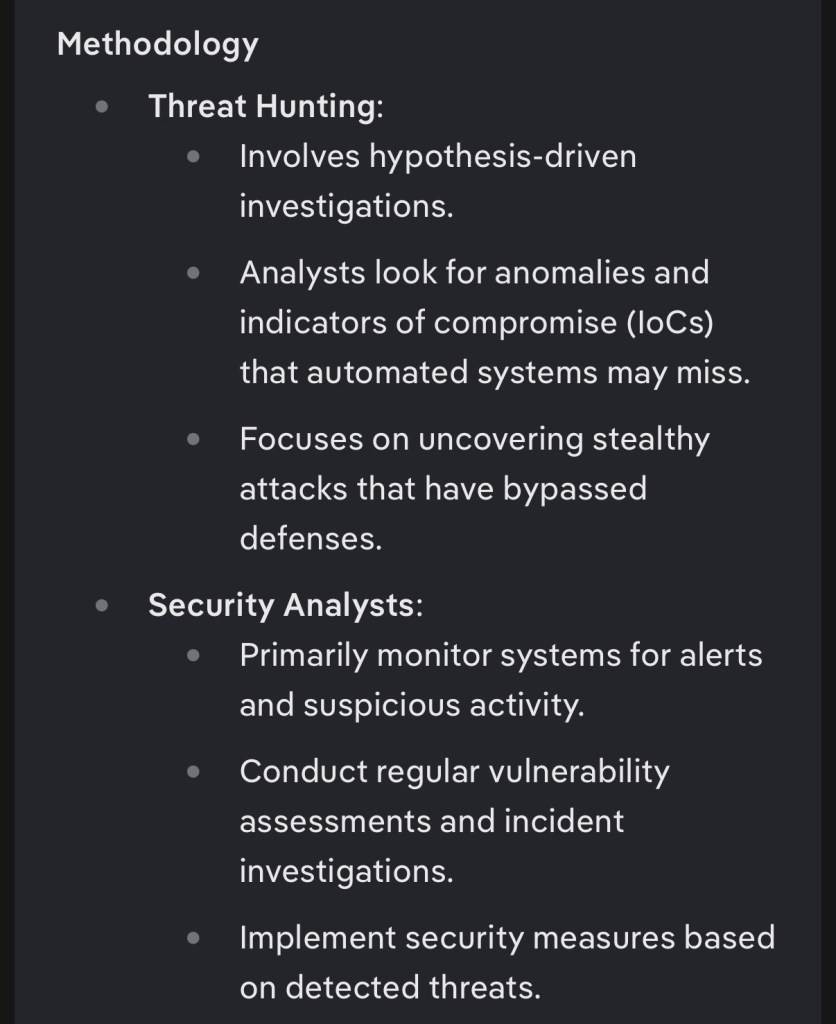
analyst (responding to SIEM alarms/events)

engineer (troubleshooting and fixing problem)

threat hunter (hypothesis = a threat actor could have caused the silent log source or known about it and took advantage, looking for anomalies that automated systems may miss, uncovering stealthy attacks that bypass defenses)

A lot of people, especially those that have worked in very large enterprise networks with hundreds employees in IT and SOC, are quick to say “that’s not part of my job description.” In those large networks where you have public websites with thousands of visitors per hour and hundreds of alarms, this may be true. I imagine many the teir 1 analyst would not be able to check every alarm if they didn’t escalate incidents to the tier 2 analyst or incident response team, and a specific threat hunter is likely the only person with time to investigate more complex attacks that bypass defense measures. The same can be said for CSPs that have a SOC where each member monitors multiple customers, or is required to escalate to the customer’s internal IR team and engineers.

However, most organizations will not have that many people on staff. All of my jobs thus far have been analysts performing the duties of security engineers, threat hunters, vulnerability management, incident response, and assessor for internal assessments. To be honest, I like it this way and I don’t believe we ever had enough work to satisfy that many different titles individually. Note I have worked as a CSP in a customer’s environment, but it was heavily focused on assessment and vulnerability management.

What tools are needed for threat hunting? A powerful SIEM is the most used threat hunting tool, AV, vulnerability scanner, network inventory, ids/ips and/or view access to the firewall. EDR/XDR is always good to have but some claim to do the threat hunting activities themselves.

This brings me to the tools that claim to be Threat Hunting tools, but are actually doing the job of a threat hunter. The issue I have with security tools taking the place of threat hunting is that by definition a threat hunter is looking for threats that the tools have missed. Personally I don’t believe tools should replace threat hunters, but that doesn’t mean the tools shouldn’t be used at all, but rather in conjunction with threat hunters. The more checks and visibility we have, the more secure we are.

This brings me to the current questions all Cyber Security professionals are wondering right now. Will AI replace cyber security employees? There’s no doubt that models with the correct information and the least guard rails are detecting and performing incident response way faster and more efficiently than any human. It is extremely scary, but I think organizations would be crazy to rely only on AI, especially in these early days of AI. SOC teams need to verify what AI is alerting on, and threat hunters need to continue assuming that AI may not catch everything. The media is quick to talk about AI finding zero day exploits but not all zero day exploits are unknown, sometimes it’s a known vulnerability but has never been discovered to work within certain applications.

Symbolic links have been used for years in Unix environments by attackers. It’s common knowledge that symbolic links make up a large number of CVEs and have their own CWE (common weakness enumeration) and new CVEs are being created all the time that fall within that CWE. Recently a number of AI models have been found to have vulnerabilities related to symbolic links. See the following quote from The Hacker News about a new AI vulnerability called GhostApproval:

The attack abuses an old Unix feature called a symbolic link, or symlink, that the assistants fail to check. A symlink quietly points to another file elsewhere on disk, so writing to it actually writes to the target.

https://thehackernews.com/2026/07/ghostapproval-symlink-flaws-could-let.html?m=1

Circling back, I have yet to see AI create a CWE, but it’s very good at creating CVEs based on existing CWEs. On top of that, security researchers are constantly finding new CWEs and CVEs that AI agents and models are vulnerable to. Where am I going with this? AI is a great tool for Cyber Security teams to have, but it shouldn’t take the place of a cyber security team. Again, the more monitoring and visibility we have, the better, but we can’t leave our security in the hands of services that itself is vulnerable to attack.

With that said, I do see a lot of these single purpose jobs being replaced by AI. If a jr analyst has one job of triaging alerts then I foresee AI replacing them. It’s very likely that security analysts and engineers will be a single role with many duties, including verifying results given by AI, but will have the time to perform those duties thanks to AI. The whole reason seperate roles within security were created is because they were needed and it’s possible that some orgs will no longer need individual security roles. Hopefully AI will make our jobs easier in the long run

A list of toys I own.

Most places I work will not allow for devices like this to be on premises without special attention, so this is basically just a list I can show my coworkers. Enjoy

Shark Jack from Hak5

https://shop.hak5.org/products/shark-jack?variant=21284894670961

WiFi pineapple (older version than what’s listed)

https://shop.hak5.org/products/wifi-pineapple?variant=81044992

LAN Turtle

https://shop.hak5.org/products/lan-turtle

HackRF

https://greatscottgadgets.com/hackrf/one/

PortaPack for HackRF

https://hackerwarehouse.com/product/portapack-h2-for-hackrf-one/

Flipper Zero

https://flipper.net/

Differences in SIEMs

This is a listing of SIEMs I’ve used in one way or another, and my notes on each. Some info may be outdated.

LogRhythm

I learned on LogRythm and have 6 years of experience. LogRhythm is an enterprise SIEM with a web interface and has optional packages (prewritten alarms, reports, playbooks, and smart response scripts (or automation/SOAR)) based on compliance packs and frameworks (ie NIST 800-53, MITRE ATTACK). It’s primarily for private cloud (or on prem). Logrhythm played with offering a web based service which would have eliminated the need for an engineer, but I think this may have fell there when they were unable to get gov customers which required a variety of compliance certifications. They may have continued with this but I don’t recall seeing it.

The good: LogRhythm has a great web UI that is easy to learn quickly. Metadata is parsed from logs and listed in columns and rows with each column searchable the same way formatted tables in Excel. It has dashboards and a large array of log processing policies. The knowledge base packages are a huge plus and it allows for threat intelligence feeds to integrate easily. It also allows for MFA using an authentication app or smart card.

The bad: LogRhythm has attempted horizontal scaling but efforts have been minimal. Basically LogRhythm requires a database, generally MS-SQL, for metadata, alarms, reports, threat intel, etc. and installs an open source version of elasticsearch for the log indexer either in centos/RedHat or windows. For a medium sized enterprise network, you likely need at least 3 servers. We were using two windows servers, one for program manager and web console, one for the log processor, and a Linux server for the data indexer. Basically the architecture is a problem. You can install it on ec2 in aws and so on, but that much data can cost more than the hardware.

Another issue is the lack of dashboard options. Hopefully this has changed. Lastly, the smart response scripts, aka automation, was limited to PowerShell only.

Elastic SIEM aka ELK Stack aka Elastic Stack

( Elastic Search, LogStash, and Kiana)

Elastic has become the go to for a lot of government entities and businesses due to it being “open source” which I’ll touch on later. Basically you can get elastic SIEM with all the services and options needed to be fully in compliance, or have all the extras built out on top of the open source version. It’s very flexible and is used for more than just a SIEM due to its quick search and unstructured database

The Good: Elastic SIEM is fast, customizable, powerful, horizontally scalable (VMs or cloud), works in public or private cloud and can adapt. Kibana itself is the web front end and has decent dashboard options, reporting, and many options. Getting the full SIEM will likely satisfy any compliance requirements. Elastic can also be used for other things, such as vuln management, or basically any situation where different types of data need to be stored in one place.

The Bad: on paper elastic looks affordable, but by the time you purchase the addons, such as security alarms, threat intelligence, notifications, AI, etc., the price isn’t much better than it’s competitors. Alternatively you can develop your own solutions and pay very little, but you will need at least one full time elastic dev, if not more. With that said, elastic is very configurable but there are many documented incidents where an engineer accidentally misconfigured something which allowed access to attackers with little effort.

Log360 ManageEngine

I just recently had the opportunity to use Log360 and I can say it does the job, but not I’m not a fan of the layout. It again requires addons with additional licenses to get everything a SIEM needs. I won’t do a good and bad on this, because I have little experience. I can say it’s easy to use, but features are lacking and searching logs or performing drill downs in general leaves a lot to be desired. During an incident time matters, and log360’s layout takes too long to navigate. For example, while attempting to search a log source, instead of only showing the log sources in my environment, it gives a drop down menu with every log sources log360 is able to ingest. Your results will show the raw log message with bits of metadata below but there’s no table or option to include/exclude that parsed data without starting a new search. I know other SIEMs are like this, but they usually have other methods without having to start a new search.

Azure Sentinel

Sentinel is the Microsoft cloud native SIEM and you will only consider Sentinel if you’re already using Azure, Defender, etc., I do like Sentinel.

The good: It’s powerful, and it has many addons based on compliance, frameworks, etc. Microsoft has video courses and other training for Sentinel. Sentinel has a powerful search and like Elastic and Splunk, has a query language (KQL) that can be saved and shared. From my experience Sentinel is fast.

The bad: compared to other SIEMs there is a learning curve with Sentinel. You can’t jump on it for the first time and figure it out in a couple hours, like with simpler SIEMs like LogRhythm and Log360.

Splunk

For years Splunk has been the go-to for Federal and DoD SOCs. I once took Splunk training under the assumption that I would be using it one day, and my most recent job is in the procurement phase of switching to Splunk.

The good: trusted across the board in many SOCs. Has everything you need compliance wise. Fast and powerful search and query language (SPL2).

The bad: there is a learning curve, which seems to be true for the more powerful SIEMs. The only big complaint I’ve heard is the price. I’ve never personally purchased a SIEM, but like with most things, you get what you pay for.