What’s the difference between a security analyst and a threat hunter?

This question drove me crazy for a while. As I read the job descriptions for a threat hunter and compared them to my job as an analyst, I couldn’t figure out how threat hunting was different from what I did. I was asking the wrong question. Not how is TH differed from my duties, but how is TH different from the job duties of a Security Analysts.

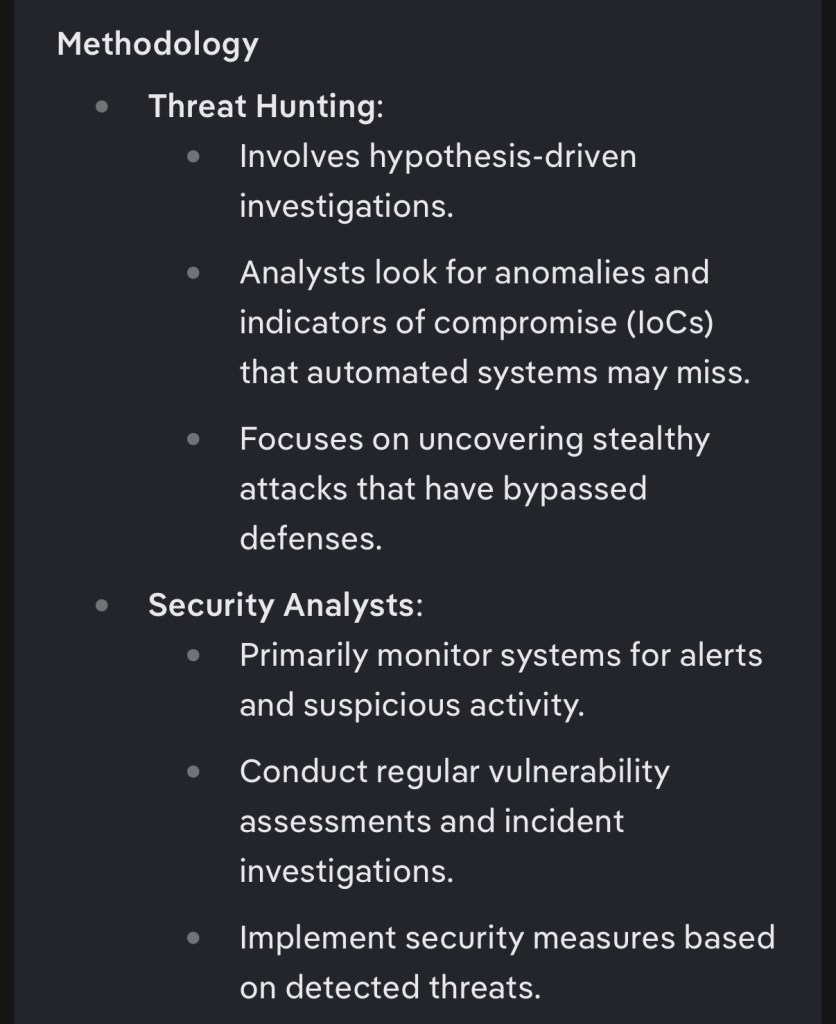
AI finally answered the question because I was forced to ask it the right way. Duck.ai doesn’t know me or my job duties (at least I hope it doesn’t) so the prompt became “how are threat hunters different from Security Analysts” and I realized I was both a threat hunter and a security analyst.

The response:
When I first became a Security Analysts and learned how to use the tools, a thought occurred to me, “How do we know the SIEM, IPS, and AV are catching everything?” And “How can I see what the SIEM might have missed?” Frankly, we had a lot of false alarms at the time and my confidence in the alarm rules set within the SIEM was low. So I decided that once alarms had been investigated and other work was done each day, I would begin searching for potential incidents within the SIEM that the alarm rules may have missed.

The line between analyst, engineer, and threat hunter gets more gray in this area of investigation because I could be doing all three at once. I started with the most likely of intrusions, web app logins. First I checked to see if my “sql injection” alarm was working within the SIEM. I wasn’t expecting an exploit to work, I was more concerned with seeing if the action would trigger an alarm. I made a very basic sql injection line in the username and password field and waited a few minutes. No alarm fired. I then created a search query that would bring up audit logs from the web app between 10mins before my sql injection attempt, until 10mins after, as well as server OS logs and network traffic logs going to and from the web app within the same time frame. I wanted to see what the SIEM could see and what the logs were actually showing. This lead to fixing a silent log source, which was the reason the SQL injection alarm didn’t fire.

I then performed a historic log review of connections to and from the web application within the last 90 days and began checking for possible intrusions by filtering out IPs and services connecting to the server and excluding usernames of the team that actually used the web app (during regular business hours) and found that no intrusions had occurred during the time frame of the silent log source. Of course someone’s account could have been used by an attacker, so I took further steps to ensure accounts created for that time frame were documented in our ticket system, and that no suspicious activity had occurred.

In my mind, I played the part of three roles:

analyst (responding to SIEM alarms/events)

engineer (troubleshooting and fixing problem)

threat hunter (hypothesis = a threat actor could have caused the silent log source or known about it and took advantage, looking for anomalies that automated systems may miss, uncovering stealthy attacks that bypass defenses)

A lot of people, especially those that have worked in very large enterprise networks with hundreds employees in IT and SOC, are quick to say “that’s not part of my job description.” In those large networks where you have public websites with thousands of visitors per hour and hundreds of alarms, this may be true. I imagine many the teir 1 analyst would not be able to check every alarm if they didn’t escalate incidents to the tier 2 analyst or incident response team, and a specific threat hunter is likely the only person with time to investigate more complex attacks that bypass defense measures. The same can be said for CSPs that have a SOC where each member monitors multiple customers, or is required to escalate to the customer’s internal IR team and engineers.

However, most organizations will not have that many people on staff. All of my jobs thus far have been analysts performing the duties of security engineers, threat hunters, vulnerability management, incident response, and assessor for internal assessments. To be honest, I like it this way and I don’t believe we ever had enough work to satisfy that many different titles individually. Note I have worked as a CSP in a customer’s environment, but it was heavily focused on assessment and vulnerability management.

What tools are needed for threat hunting? A powerful SIEM is the most used threat hunting tool, AV, vulnerability scanner, network inventory, ids/ips and/or view access to the firewall. EDR/XDR is always good to have but some claim to do the threat hunting activities themselves.

This brings me to the tools that claim to be Threat Hunting tools, but are actually doing the job of a threat hunter. The issue I have with security tools taking the place of threat hunting is that by definition a threat hunter is looking for threats that the tools have missed. Personally I don’t believe tools should replace threat hunters, but that doesn’t mean the tools shouldn’t be used at all, but rather in conjunction with threat hunters. The more checks and visibility we have, the more secure we are.

This brings me to the current questions all Cyber Security professionals are wondering right now. Will AI replace cyber security employees? There’s no doubt that models with the correct information and the least guard rails are detecting and performing incident response way faster and more efficiently than any human. It is extremely scary, but I think organizations would be crazy to rely only on AI, especially in these early days of AI. SOC teams need to verify what AI is alerting on, and threat hunters need to continue assuming that AI may not catch everything. The media is quick to talk about AI finding zero day exploits but not all zero day exploits are unknown, sometimes it’s a known vulnerability but has never been discovered to work within certain applications.

Symbolic links have been used for years in Unix environments by attackers. It’s common knowledge that symbolic links make up a large number of CVEs and have their own CWE (common weakness enumeration) and new CVEs are being created all the time that fall within that CWE. Recently a number of AI models have been found to have vulnerabilities related to symbolic links. See the following quote from The Hacker News about a new AI vulnerability called GhostApproval:

The attack abuses an old Unix feature called a symbolic link, or symlink, that the assistants fail to check. A symlink quietly points to another file elsewhere on disk, so writing to it actually writes to the target.

https://thehackernews.com/2026/07/ghostapproval-symlink-flaws-could-let.html?m=1

Circling back, I have yet to see AI create a CWE, but it’s very good at creating CVEs based on existing CWEs. On top of that, security researchers are constantly finding new CWEs and CVEs that AI agents and models are vulnerable to. Where am I going with this? AI is a great tool for Cyber Security teams to have, but it shouldn’t take the place of a cyber security team. Again, the more monitoring and visibility we have, the better, but we can’t leave our security in the hands of services that itself is vulnerable to attack.

With that said, I do see a lot of these single purpose jobs being replaced by AI. If a jr analyst has one job of triaging alerts then I foresee AI replacing them. It’s very likely that security analysts and engineers will be a single role with many duties, including verifying results given by AI, but will have the time to perform those duties thanks to AI. The whole reason seperate roles within security were created is because they were needed and it’s possible that some orgs will no longer need individual security roles. Hopefully AI will make our jobs easier in the long run


A list of toys I own.

Most places I work will not allow for devices like this to be on premises without special attention, so this is basically just a list I can show my coworkers. Enjoy

Shark Jack from Hak5

https://shop.hak5.org/products/shark-jack?variant=21284894670961

WiFi pineapple (older version than what’s listed)

https://shop.hak5.org/products/wifi-pineapple?variant=81044992

LAN Turtle

https://shop.hak5.org/products/lan-turtle

HackRF

https://greatscottgadgets.com/hackrf/one/

PortaPack for HackRF

https://hackerwarehouse.com/product/portapack-h2-for-hackrf-one/

Flipper Zero

https://flipper.net/

Differences in SIEMs

This is a listing of SIEMs I’ve used in one way or another, and my notes on each. Some info may be outdated.

LogRhythm

I learned on LogRythm and have 6 years of experience. LogRhythm is an enterprise SIEM with a web interface and has optional packages (prewritten alarms, reports, playbooks, and smart response scripts (or automation/SOAR)) based on compliance packs and frameworks (ie NIST 800-53, MITRE ATTACK). It’s primarily for private cloud (or on prem). Logrhythm played with offering a web based service which would have eliminated the need for an engineer, but I think this may have fell there when they were unable to get gov customers which required a variety of compliance certifications. They may have continued with this but I don’t recall seeing it.

The good: LogRhythm has a great web UI that is easy to learn quickly. Metadata is parsed from logs and listed in columns and rows with each column searchable the same way formatted tables in Excel. It has dashboards and a large array of log processing policies. The knowledge base packages are a huge plus and it allows for threat intelligence feeds to integrate easily. It also allows for MFA using an authentication app or smart card.

The bad: LogRhythm has attempted horizontal scaling but efforts have been minimal. Basically LogRhythm requires a database, generally MS-SQL, for metadata, alarms, reports, threat intel, etc. and installs an open source version of elasticsearch for the log indexer either in centos/RedHat or windows. For a medium sized enterprise network, you likely need at least 3 servers. We were using two windows servers, one for program manager and web console, one for the log processor, and a Linux server for the data indexer. Basically the architecture is a problem. You can install it on ec2 in aws and so on, but that much data can cost more than the hardware.

Another issue is the lack of dashboard options. Hopefully this has changed. Lastly, the smart response scripts, aka automation, was limited to PowerShell only.

Elastic SIEM aka ELK Stack aka Elastic Stack

( Elastic Search, LogStash, and Kiana)

Elastic has become the go to for a lot of government entities and businesses due to it being “open source” which I’ll touch on later. Basically you can get elastic SIEM with all the services and options needed to be fully in compliance, or have all the extras built out on top of the open source version. It’s very flexible and is used for more than just a SIEM due to its quick search and unstructured database

The Good: Elastic SIEM is fast, customizable, powerful, horizontally scalable (VMs or cloud), works in public or private cloud and can adapt. Kibana itself is the web front end and has decent dashboard options, reporting, and many options. Getting the full SIEM will likely satisfy any compliance requirements. Elastic can also be used for other things, such as vuln management, or basically any situation where different types of data need to be stored in one place.

The Bad: on paper elastic looks affordable, but by the time you purchase the addons, such as security alarms, threat intelligence, notifications, AI, etc., the price isn’t much better than it’s competitors. Alternatively you can develop your own solutions and pay very little, but you will need at least one full time elastic dev, if not more. With that said, elastic is very configurable but there are many documented incidents where an engineer accidentally misconfigured something which allowed access to attackers with little effort.

Log360 ManageEngine

I just recently had the opportunity to use Log360 and I can say it does the job, but not I’m not a fan of the layout. It again requires addons with additional licenses to get everything a SIEM needs. I won’t do a good and bad on this, because I have little experience. I can say it’s easy to use, but features are lacking and searching logs or performing drill downs in general leaves a lot to be desired. During an incident time matters, and log360’s layout takes too long to navigate. For example, while attempting to search a log source, instead of only showing the log sources in my environment, it gives a drop down menu with every log sources log360 is able to ingest. Your results will show the raw log message with bits of metadata below but there’s no table or option to include/exclude that parsed data without starting a new search. I know other SIEMs are like this, but they usually have other methods without having to start a new search.

Azure Sentinel

Sentinel is the Microsoft cloud native SIEM and you will only consider Sentinel if you’re already using Azure, Defender, etc., I do like Sentinel.

The good: It’s powerful, and it has many addons based on compliance, frameworks, etc. Microsoft has video courses and other training for Sentinel. Sentinel has a powerful search and like Elastic and Splunk, has a query language (KQL) that can be saved and shared. From my experience Sentinel is fast.

The bad: compared to other SIEMs there is a learning curve with Sentinel. You can’t jump on it for the first time and figure it out in a couple hours, like with simpler SIEMs like LogRhythm and Log360.

Splunk

For years Splunk has been the go-to for Federal and DoD SOCs. I once took Splunk training under the assumption that I would be using it one day, and my most recent job is in the procurement phase of switching to Splunk.

The good: trusted across the board in many SOCs. Has everything you need compliance wise. Fast and powerful search and query language (SPL2).

The bad: there is a learning curve, which seems to be true for the more powerful SIEMs. The only big complaint I’ve heard is the price. I’ve never personally purchased a SIEM, but like with most things, you get what you pay for.

My first responsible disclosure was a disaster.

I will be redacting a lot from this post for legal reasons, but I believe it’s important for people to know and learn from. In other words, don’t make the same mistakes I did.

So what is a responsible disclosure? Let’s say you’re in the city and need cash so you find an ATM. As you approach it, you notice a small door with a lock on the side is open and you can clearly see cash inside the door within reach. What do you do? Some people may notice the door and quickly swipe as many $20s as they can while avoiding the camera, and likely never get caught. Most people would read this and agree that the responsible choice would be to call either the Police, the bank that owns the ATM, or both.

Let’s say you decide to call the bank. You didn’t take any money and you didn’t open the door. You noticed an issue that would cause harm to their business and decided contacting them was the right thing to do. You contact the bank and after explaining the situation, your put on hold. While waiting a police officer suddenly walks up and says the bank called saying someone was actively stealing from their ATM. They begin to question you as the person on the phone hangs up.

You might think this sounds unreasonable, unfair, or even a bit evil. Who knows how long the door had been opened and how many people stole from it, so why accuse the one person that did the right thing and contacted the owner? The call itself is a form of a “responsible disclosure” and unfortunately the outcome is often very similar to what I just described.

Responsible disclosures can involve a vulnerability, a bug, a zero day, poor configuration, or just poor procedure. For example, a cloud engineer may have unintentionally set an S3 bucket to public, exposing sensitive data to anyone that stumbles upon it. An online store may be using an older version of a web app containing a vulnerability that allows a customer to change their cart’s total at checkout. Or a hospital may be using unencrypted radio communication to send private information about their patients. More about that later.

A story from a few years ago is a perfect example of how a responsible disclosure can go wrong. the following is excerpts from https://techcrunch.com/2021/10/15/f12-isnt-hacking-missouri-governor-threatens-to-prosecute-local-journalist-for-finding-exposed-state-data/

“St. Louis Post-Dispatch journalist Josh Renaud reported that the website for the state’s Department of Elementary and Secondary Education (DESE) was exposing over 100,000 teachers’ Social Security numbers. These SSNs were discovered by viewing the HTML source code of the site’s web pages, allowing anyone with an internet connection to find the sensitive information by right-clicking the page and hitting “view page source.”… The Post-Dispatch reported the vulnerability to state authorities to patch the website, and delayed publishing a story about the problem to give the state enough time to fix the problem.”…Missouri’s Republican Governor Mike Parson described the journalist who uncovered the vulnerability as a “hacker”, and said the newspaper uncovered the flaw in “an attempt to embarrass the state”.

Due to the accusation coming from the governor in a public setting, and the accused being a journalist, this story quickly spread across the Internet. The fact that this data leak was so easy to discover and replicate, the backlash came from more than just the cyber security community. A new slogan was born “F12 isn’t a crime” due to F12 being a hot key for “view page source”, knowing that simply pressing one single key could be considered illegal made the governor’s comments all the more absurd. This story was popular in its time, but this happens way more than people realize, and continues to happen today.

Personally I believe the biggest reason many responsible disclosures end in punishment instead of praise is due to a lack of knowledge. I used the example of the ATM above so anyone could understand, but in cyber security the situation is a bit more complex.

Frame of mind and opinions also play a big role in how or why we do responsible disclosure. Fundamentally we do responsible disclosures because we feel it’s the right thing to do, but there are few that do it for money, recognition, blackmail, and other malicious reasons. It’s important to consider these things before making a disclosure, and it’s also important to consider how the entity you’re disclosing to will react. Blackmail is often the first assumption when you receive a responsible disclosure, even if it’s rarely ever the reason.

When I was a kid, I decided to scan a range of IP addresses similar to my own for instances of NetBus, a remote access trojan in the late 90s. NetBus was a script kiddie tool with a GUI that ran in Windows 98. The infected file was an exe that you could rename, create an icon for, and easily have it open a jpeg or another application while silently installing a backdoor on the victim’s computer. So many students in my highschool had learned of its existence that I was curious to see if there were many infected computers using the same ISP. I found one, connected to, and searched for an email address to contact the person. I learned it was an older lady in my town and emailed her, giving only my first name and explained that her computer was infected with a Trojan that allowed anyone to connect to it and take control. I included the infected filename and how to delete it, then I added a password onto the RAT to prevent anyone else from accessing it. She replied, accused me of hacking her and said the file I pointed out was added by her grandson to prevent people like me from hacking her, accused me of trying to trick her into removing it, and threatened to call the “internet police” (something older people everywhere believed existed back then). I sighed, deleted her info, and threw away the password that I had set. I could sleep better at night knowing that I helped her, even if she believed I had done the opposite. I was still young at the time and thought I was doing right even if the way I did it was a gray area of whether it was legal or not.

That’s not the story from the title though, although I wish I had remembered it at the time. As I mentioned in other posts, Software Defined Radio is a hobby for me. I won’t go into detail on the exact technology, but I will say that unencrypted data was being transmitted using 1990s pager technology that included personal patient information (as mentioned earlier). Anyone that has dabbled with SDR enough has probably found this or seen it on a youtube video, to the point it’s common knowledge to people in the know. It’s not a cellular frequency, and receiving this data is not illegal.

I was using SDR# for Windows to tune a $10 digitalTV USB dongle to receive digital signals in audio form that was being broadcasted. I piped the audio using a virtual microphone into a virtual audio output. I used a second application called PDW to listen to the virtual audio output and decode the audio into text. PDW is set to decode POCSSAG and Flex digital signals, which is what pagers used. The interesting thing about pagers is that every message is sent to every pager, and the pager itself ignores all messages except the ones directed to it. This is similar to the old style network hubs, which would send packets to every computer connected to the hub, and the computer would ignore the packets not meant for it. PDW itself has a GUI and looks like it was developed in the early 2000s.

I was showing this to a friend that worked in network Security for a health care organization, and he was shocked. He looked at a few of the identifiable addresses, and told me what organizations to reach out to, saying that maybe I could get a bug bounty or at least a very thankful IT person.

In my mind the blame was on the people sending the data, not the tech itself and not the organization. It’s no different than a data leak over email, due to email being unencrypted in nature. For example, If I sent classified info using email, the blame would be on me because email is generally not encrypted. This would be considered misuse, not my employer’s fault and not the fault of the email vendor.

I contacted the two healthcare organizations that we were able to find, and no, I can not mention their name, frequencies, pager vendor, or the contents of the messages. One was extremely grateful and said they would send it up the chain and put a stop to it. The other never responded.

The next day an attorney and the CEO of a pager vendor contacted me indirectly, threatening a lawsuit and stating that I was in violation of federal wiretapping laws. They had been contacted by the second healthcare org that I emailed and the blame had apprently been put in the vendor. After some back and forth and the fact that they decided to contact my employer, who had nothing to do with the situation, I was sent a “Cease and Desist” and told that they would not press charges as long as I agreed to it and returned it signed.

To be clear, I didn’t go to the press about the issue, nor did I make any kind of public disclosure. The source was the misuse by the employees of the healthcare org and that’s who I disclosed it to. Rather than fixing the issue through policy and educating their staff on how PII shouldn’t be sent over unencrypted comms, they instead forwarded my disclosure to the vendor, who’s gut reaction was that I was trying to attack their business’ reputation.

Even though I hadn’t broken any laws (I had multiple lawyers confirm that), to keep things civil I signed their cease and desist agreement stating that I would not intentionally capture data from that vendor, and added that I never intentionally captured data from them in the first place and was not aware of their existence before. I will note again that neither the vendor, their customer, nor the frequencies they use has been added to this blogpost.

It’s hard to say if they were trying to scare me, trying to save face in front of a customer, or they just didn’t know enough about their own product and believed it to be a secure way to send personal and private details of patients who expect a hospital to safeguard that info. I learned something that day that I should have already known. DO NOT give your real name in a responsible disclosure. There are exceptions, such as bug bounty programs like hackerone.com and other bug bounties. When reaching out directly, no matter how noble your actions are, you must protect yourself and assume the worse. Use proper OPSEC. Look for email providers on TOR or use a VPN to sign up with Protonmail under a fake name, while using a fresh browser within a temporary VM.

Like many others, I expected the second healthcare org to be as thankful as the first. Just like one would expect a bank to thank the person that alerted them to a breach in their ATM. I hope this saves someone from the legal consequences of uneducated and embarrassed CEOs and governors when a flaw is brought to light by someone trying to help.

CEUs for CompTIA certs

The truth is I forgot about this blog site because I’ve been very busy, and I try to “unplug” the the last part of the day.

That being said, my CompTIA certs are about to expire and I need to CE points to add. I will be adding several blog entries to acquire those points.

This is basically a way to extend the expiration of your certification without purchasing and passing another exam. There are costs involved, but they are much less than the cost of another certificate.

To add CEU points to a CompTIA cert, the following is listed for blogs:


You can earn 1 CEU for each blog post of at least 500 words.

Timing: Your blog post must be written and published during your three-year renewal cycle.

Relevance: At least 50 percent of the blog post content must relate to one or more of the exam objectives for the certification you’re renewing.

Documentation: Submit the following documentation to receive CEUs for the blog post:

  1. URL or copy of the published work with your name and the date published.
  2. Description of the content covered

I currently need 28 more points. I will be using other means of acquiring points, such as work experience which requires a letter from my supervisor on company letterhead.

ChatGPT Part1

If you have listened to the news, podcasts, or youtube over the passed few weeks, you have probably heard ChatGPT mentioned. There are numerous videos online showing how to use it to do your homework, write code, make money, and even a few surprising hacks and jailbreaks. It has reignited the fear and debate over whether AI will cause a loss of jobs, specifically for coders and customer service operators more recently.

This is my experience so far, and some ideas on whether people need to be worried.

Chatting with chatGPT is like chatting with many chatbots, except responses are lengthy and more accurate, and you can ask that responses be altered in specific ways. This is the “Transformative” portion if chatgpt, allowing the bot to continue referencing the original question. Basic it remembers what started the conversation and isn’t limited to a single answer.

Here, i ask it to tell me a joke about AI, then I asked for a different answer in a cheeky way:

Now I go on to ask it to tell a joke about AI, but in the style if Edgar Allen Poe. (recently binge watched Wednesday):

The joke continue further on in a similar length to “The Raven”

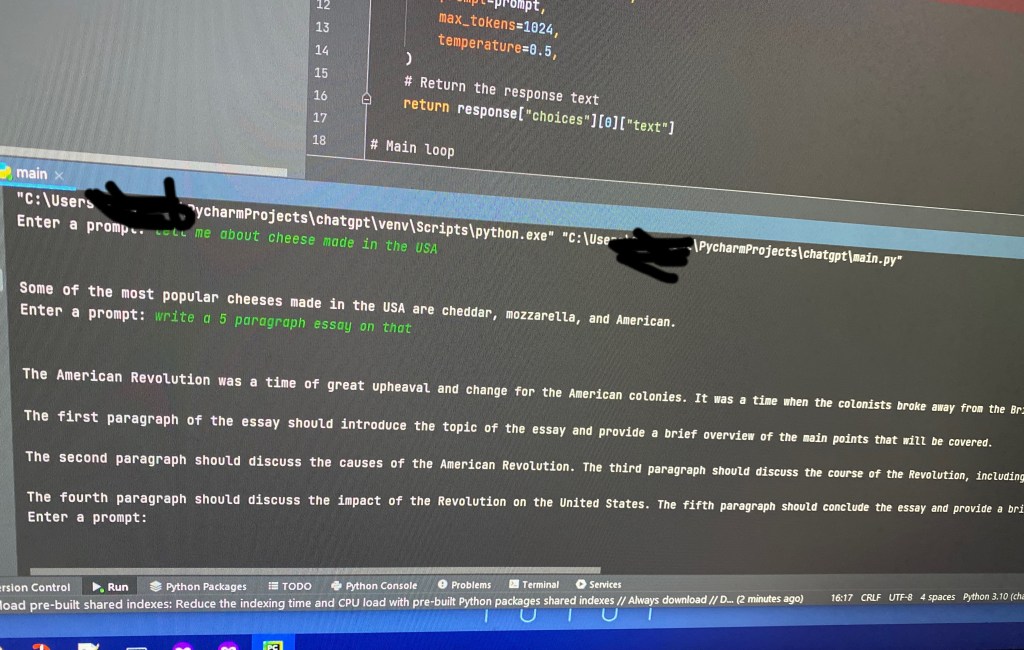
For us, the most useful everyday use of ChatGPT would be it’s ability to write code. Later I asked it how to create my own chatGPT using python script. It gave me all the code, as well as an explanation of how to run it and committed what each part of the code did. Ut referenced api keys, which i asked “how do i acquire an api key that this code needs?” And it gave me the url and detailed steps to acquire an api key from openai

Within a few minutes, I had my own chatgpt app

I want to play with this more hopefully find some jail breaks and hacks. So I’m going to label this post as part 1 with as many as 2 more to come.

For now, I want to talk about possibilities. Yes, this is a great coding tool. Google is a great coding tool, but you can spend a long time searching for code and scripts that accomplishes your task, runs in your environment, and is the correct version. GitHub is amazing, but it can be overwhelming to someone with little or no programming knowledge. ChatGPT can literally make you custom code and scripts based on what you ask for. If they don’t work, you simply tell the chat, ad well ad the error, and it will rewrite it.

This is perfect for automation and SOAR for those of us in defensive security. Let’s say you are a jr analyst and you know bash any python, but not powershell, which is primarily what your SIEM uses for automated responses on Windows host. Maybe you need to make automation that quarantine a host to prevent lateral movement from an attacker, and Powershell is the only script all of the host in your environment will run. ChatGPT: write a powershell script that will quarantine a compromised host on a network. Copy, then go straight to testing.

Will people loose jobs from this? With this specific version, I doubt it. What comes from this could cause some job loss in the developer field, but it’s more likely developers will use it as a tool to help with parts of their code. Besides, there are still errors in some of the code ChatGPT produces, and many organizations would not want every detail of their network and trade secrets handed over to OpenAI to let software owned by openAI write their infrastructure as code, scripts, and full apps. Basically I’m saying coders won’t loose their jobs, but the knowledge required to be a coder might include people who know virtually no languages.

As I stated above, I would like to follow up on this post. I think in the next few weeks we will see uses for this AI that we can’t imagine at the moment.

Link

Here’s a list of online OSINT tools and more. Some require payment.
I promise to update this list. There are still many sites I want to test before adding.

Social Media

https://sovip.io/?pa=1 – SoVIP Snapchat Search – may include NSFW photos

https://www.social-searcher.com/ Social Searcher
https://www.social-searcher.com/google-social-search/ Google Social Search

https://roadtolarissa.com/javascript/reddit-comment-visualizer/ Reddit Comment History

Photo Forensics

https://pimeyes.com/en Pimeyes Reverse Image Search

https://fotoforensics.com/ Foto Forensics

https://tineye.com TinEye Reverse Image Search

Network/Domain/IP/Website information

https://shodan.io – Search IoT, servers, SCADA, Network Appliances, etc.

https://www.sans.org/posters/google-hacking-and-defense-cheat-sheet/ SANS Google Dorking Cheat Sheet

https://hackertarget.com/ HackerTarget’s various IP and Domain lookup tools.

https://urlscan.io/ enumerate websites, get screenshots, HTTP redirects, and behavior. Great for reverse engineering URLs in phishing attacks.

Podcast/Books/etc (mostly Michael Bazzell)

https://inteltechniques.com/podcast.html – Best OSINT Podcast IMO

https://unredactedmagazine.com/ – Unredacted Magazine

https://inteltechniques.com/book1.html – Open Source Intelligence Techniques 9th edition

Multiple Tools

https://inteltechniques.com/tools/index.html – IntelTechniques Search Tools

https://start.me/p/rxRbpo/ti – @paranoid_ch1ck’s tools on start.me

https://start.me/p/L1rEYQ/osint4all – OSINT4ALL on start.me

https://start.me/p/wMdQMQ/tools – Technisette’s Tools page on start.me

https://osintframework.com/ – OSINT Framework (not a start.me page)

Maps – Location – Addresses

https://www.mapchannels.com/ – Various map types. Includes Dual Map and quad map features.

https://www.arcgis.com/apps/mapviewer/index.html – arcgis – local governments use this system for public parcel maps. Consider Googling: (county) (state) GIS Parcel Map

Breach Databases

https://haveibeenpwned.com/ Have I Been Pwned? is always a good starting point in an investigation.

https://intelx.io – Intelligence X

https://rapidapi.com/rohan-patra/api/breachdirectory – BreachDirectory API

https://dehashed.com/ – Dehashed

https://www.peopledatalabs.com/ – People Data Labs – Personal and business data purchased from various sources

https://psbdmp.ws/ – PSBDMP – Pastebin Dumps

Misc.

https://buckets.grayhatwarfare.com/ – Public Buckets AWS, Azure, and more.

https://search.censys.io/ – Asset and attack surface search

https://gchq.github.io/CyberChef/ – CyberChef – aka The Cyber Swiss Army Knife. Decode/Encode different text and file formats, encryption, and more.

Possible ways to circumvent censorship for Russians

With Putin’s war on Ukraine, and the death of thousands of Ukraine’s civilians, many Russian citizen’s appear to be manipulated by the government owned media. Although many Russian’s may also be afraid to publicly say what they really think, and what they know ti be true. Regardless, Russia is heavily censoring any news media site that calls Russian’s terrorism a “war”.

Here are some possible ways that the outside internet could be accessed from within Russia, so that Russian citizens can see what the rest of the world is seeing and saying about this invasion.

Tor Browser torproject.org Tor aka The Onion Router, is a network built for anonymous web browsing that is accessed using the Tor Browser, Tails OS, or by one of several scripts that can be run to route all traffic through Tor. Tor uses three layers of encryption so that traffic is fully encrypted up until between the exit router and the source.

If Tor alone does not prevent blocked sites or censorship, consider reading about the options on Tor’s censorship circumvention site https://tb-manual.torproject.org/circumvention/

You may also consider changing your DNS to 1.1.1.1 which uses a secure DNS, a feature available in Firefox. This alone is likely not enough to view censored websites from Russia

https//privateinternetaccess.com/

VPNs are another way to possibly circumvent censorship online. I can personally vouch for Private Internet Access aka PIA https://www.privateinternetaccess.com/ this is a paid subscription, but only costs around $35 yearly.

Free VPNs exist, but they are highly regarded as dangerous. Not because VPN companies want money, but because most free or community based VPNs tend to be full of vulnerabilities, including the ability or users to see traffic from other users.

Specifically for viewing censored media, you could consider a web proxy such as proxysite.com. Basically your using one website to open another. This is not recommended for privacy, so do not give any personal information. It is however, very useful for censorship.

I will continue to add other options as I learn of them. If anything isn’t mentioned here, consider adding a comment with other possible ideas.

Update 2-3-2022

Hello followers! All 4 or 5 of you! I haven’t created a blog post for a while, and wanted to add something to show that this site isn’t dead. I started this nearly a year ago, due to suggestions from a friend and from a talk at KringleCon 2021. To be honest I’m a bit of a perfectionist, which makes blogging very difficult. I’m the kind of person that will begin to write, suddenly realize that I don’t like the site’s theme, spend 45 minutes trying to find a theme I do like, then get frustrated and give up. I have more drafts than actual posts, most of which will never be public, but I keep them because of the time and effort invested into it. Aside from that, 2021 was hard. Not because of Covid 19 specifically, but for multiple, non-related reasons. Also work has become more involved this year, and I’m the kind of person that doesn’t want to see a computer screen after staring at one all day at work, and sometimes I don’t want to think about security, after thinking about it all day at work.
In the midst of all that, this blog hasn’t been a priority. However, I’m not getting rid of it anytime soon. I do plan to eventually do some updates, maybe change the layout to something easier to read.

Are We Correctly Educating Users about Phishing?


Technology that stands the test of time becomes more complex. Likewise, attacks also mature and become more complex. So why do we continue to educate people on phishing the same way we did 10 years ago?

I see a lot phishing attacks, and those attacks become more complex every day, but the user education hasn’t changed much. The following is a list that comes from top search results for “How to prevent phishing.” You can probably guess most of them without looking:

  • Misspelled words
  • Bad grammar
  • Don’t open attachments
  • Domain name misspelled in links
  • The message creates a sense of urgency.
  • The message asks for money.
  • Odd greeting “Hey Dear,”

Before you scoff, I’m aware that this holds true to many phishing attacks that occur today. I can check my junk folder right now and see examples of each of these. However, I’m not worried about the email that lands in my junk folder. I’m worried about the convincing emails that pass all the checks and arrive in my inbox.

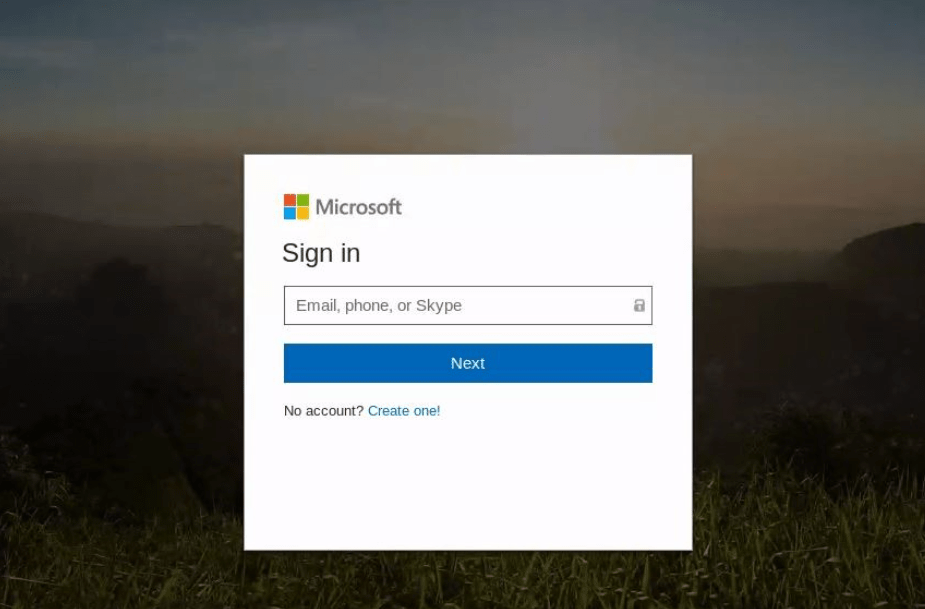
In my personal experience on the enterprise level, more than 80% of the phishing attacks are credential harvesting. An email will claim to be a service used by a coworker to send you a fax, document, or voicemail. These emails look legit with no spelling mistakes and occasionally include some standard customer policy or disclaimer at the bottom, and sometimes a company logo. Many will show a thumbnail or convincing icon of a document, a fake media player, or link of some kind. All of which are links to a website. When clicked, a webpage opens asking for credentials to proceed. Many times, the page will show your email address at the top, giving it that extra legit look. Once the username and/or password is typed in, the creds are sent to the attacker and the webpage forwards the victim to the real site.

The credentials it’s trying to harvest are generally Google or Office365, but can occasionally show up as iCloud, Twitter, Facebook, or your email provider.

An example of a spoofed Office 365 login page found in a phishing attack, created to steal credentials.

Digging deeper, I’ve noticed many times that the landing page isn’t the original URL in the email. The link will send the user to a page on a domain that does some checks and then forwards to another webpage, or sometimes multiple pages, and many times on a separate domains. Occasionally they will attempt to check for active sessions on Twitter, iCloud, LinkedIn, O365, Google, and Facebook, and redirect to a spoofed portal based on what it finds.

Others involve “Off the Shelf” Phishing Apps, such as BLACK EYE Phishing Tool, which is the updated version of ShellPhish. https://github.com/8L4NK/blackeye

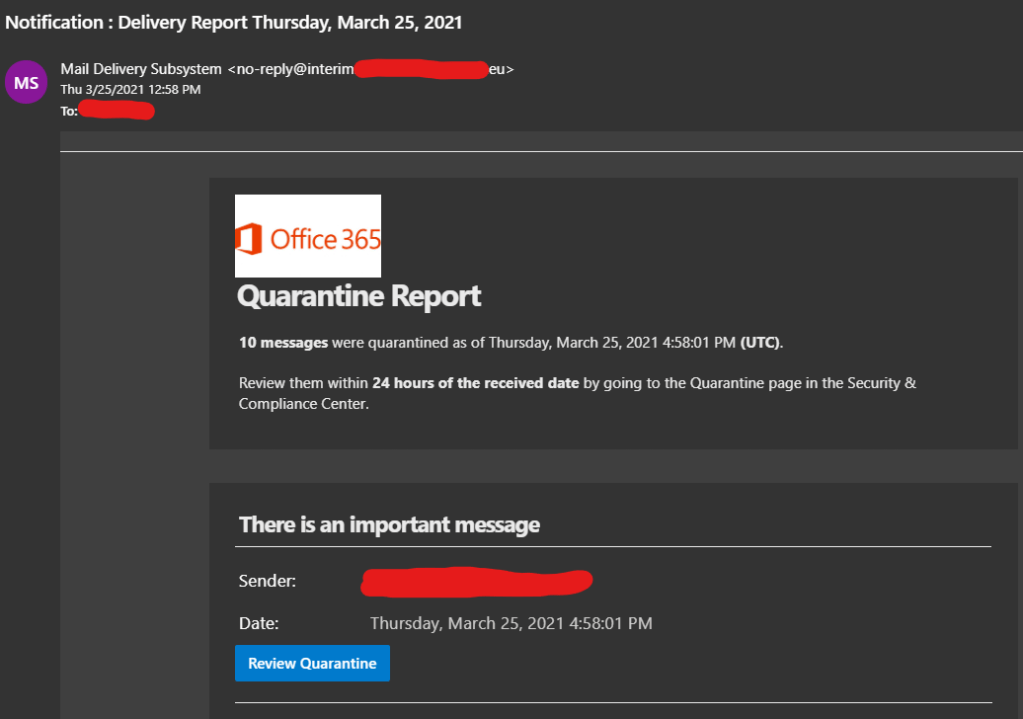
So what does a convincing phishing attack look like? Below is an example of a phishing attack that threw me off at first. If I wasn’t already familiar with the types of emails sent my O365 Security and Compliance, this would have been hard to spot. The first clue was the sender’s address.

This was a clever idea. Most people would not expect an email telling you to check O365 Security and Compliance to be malicious. It has the O365 logo, convincing subject line and sender name, and an added sense of urgency. Note that there are no spelling mistakes, attachments, bad grammar, odd greetings, or requests for money. From the list above, the only item you can see is the sense of urgency.

Back to the reason for this post, are we educating people properly about phishing attacks? My answer is ‘not entirely’. That earlier list is useful because attacks like that still exist, but bad spelling and grammar should be a side note, not the top of the list, and unfortunately that’s the only part most people remember.

Here are a few suggestions I have for phishing education:

First off, people need to consider when they should and should not give out their email address. I say this for two reasons:
1. If signing up for a free service, your information is likely to be sold, and it’s not always clear who is purchasing it.
2. Giving out your email address less means you receive less emails. The more emails you receive, the more likely you are to rush through checking them.

We need to be more cautious on who we choose to give our information to. We might trust that Facebook will only show our information to those in our friends list, but what happens when their information is leaked? At the time of writing this, a recent news story showed personal data had been leaked from 533 million Facebook accounts. This included names, email addresses, physical addresses, phone numbers, date of birth, gender, and so on.

If you are required to provide an email address for a service, consider having two separate email accounts, one for personal and financial use, and another signing up for services, such as social media or an app. This can also help people spot emails that don’t belong.

Most of all, use common sense. People need to take time to ask themselves “why am I receiving this email?” The person that received the O365 security and compliance email above did not have access to that service, and anyone that does have access knows better. For all unexpected emails, don’t click the link within the email. Type the address into the browser manually, or use a search engine. URLs and Links within emails make up most of the phishing attacks that make it into an inbox.

If your friends, family, or coworkers email you asking for anything specific, such as money or personal information, call them. Especially if there is a sense of urgency. If the email says they can’t be reached, contact them another way. If it was that urgent, they probably wouldn’t have sent an email.

If you suspect that your username and password has been stolen, change your password as soon as possible. If any other account shares the same password, changes those also. Use 2 Factor Authentication!!! Either an authenticator app or a physical device like a Yubikey. You can purchase a Yubikey 5 with NFC from Amazon using my affiliated link below:

Yubikey 5 NFC on Amazon