My first responsible disclosure was a disaster.

I will be redacting a lot from this post for legal reasons, but I believe it’s important for people to know and learn from. In other words, don’t make the same mistakes I did.

So what is a responsible disclosure? Let’s say you’re in the city and need cash so you find an ATM. As you approach it, you notice a small door with a lock on the side is open and you can clearly see cash inside the door within reach. What do you do? Some people may notice the door and quickly swipe as many $20s as they can while avoiding the camera, and likely never get caught. Most people would read this and agree that the responsible choice would be to call either the Police, the bank that owns the ATM, or both.

Let’s say you decide to call the bank. You didn’t take any money and you didn’t open the door. You noticed an issue that would cause harm to their business and decided contacting them was the right thing to do. You contact the bank and after explaining the situation, your put on hold. While waiting a police officer suddenly walks up and says the bank called saying someone was actively stealing from their ATM. They begin to question you as the person on the phone hangs up.

You might think this sounds unreasonable, unfair, or even a bit evil. Who knows how long the door had been opened and how many people stole from it, so why accuse the one person that did the right thing and contacted the owner? The call itself is a form of a “responsible disclosure” and unfortunately the outcome is often very similar to what I just described.

Responsible disclosures can involve a vulnerability, a bug, a zero day, poor configuration, or just poor procedure. For example, a cloud engineer may have unintentionally set an S3 bucket to public, exposing sensitive data to anyone that stumbles upon it. An online store may be using an older version of a web app containing a vulnerability that allows a customer to change their cart’s total at checkout. Or a hospital may be using unencrypted radio communication to send private information about their patients. More about that later.

A story from a few years ago is a perfect example of how a responsible disclosure can go wrong. the following is excerpts from https://techcrunch.com/2021/10/15/f12-isnt-hacking-missouri-governor-threatens-to-prosecute-local-journalist-for-finding-exposed-state-data/

“St. Louis Post-Dispatch journalist Josh Renaud reported that the website for the state’s Department of Elementary and Secondary Education (DESE) was exposing over 100,000 teachers’ Social Security numbers. These SSNs were discovered by viewing the HTML source code of the site’s web pages, allowing anyone with an internet connection to find the sensitive information by right-clicking the page and hitting “view page source.”… The Post-Dispatch reported the vulnerability to state authorities to patch the website, and delayed publishing a story about the problem to give the state enough time to fix the problem.”…Missouri’s Republican Governor Mike Parson described the journalist who uncovered the vulnerability as a “hacker”, and said the newspaper uncovered the flaw in “an attempt to embarrass the state”.

Due to the accusation coming from the governor in a public setting, and the accused being a journalist, this story quickly spread across the Internet. The fact that this data leak was so easy to discover and replicate, the backlash came from more than just the cyber security community. A new slogan was born “F12 isn’t a crime” due to F12 being a hot key for “view page source”, knowing that simply pressing one single key could be considered illegal made the governor’s comments all the more absurd. This story was popular in its time, but this happens way more than people realize, and continues to happen today.

Personally I believe the biggest reason many responsible disclosures end in punishment instead of praise is due to a lack of knowledge. I used the example of the ATM above so anyone could understand, but in cyber security the situation is a bit more complex.

Frame of mind and opinions also play a big role in how or why we do responsible disclosure. Fundamentally we do responsible disclosures because we feel it’s the right thing to do, but there are few that do it for money, recognition, blackmail, and other malicious reasons. It’s important to consider these things before making a disclosure, and it’s also important to consider how the entity you’re disclosing to will react. Blackmail is often the first assumption when you receive a responsible disclosure, even if it’s rarely ever the reason.

When I was a kid, I decided to scan a range of IP addresses similar to my own for instances of NetBus, a remote access trojan in the late 90s. NetBus was a script kiddie tool with a GUI that ran in Windows 98. The infected file was an exe that you could rename, create an icon for, and easily have it open a jpeg or another application while silently installing a backdoor on the victim’s computer. So many students in my highschool had learned of its existence that I was curious to see if there were many infected computers using the same ISP. I found one, connected to, and searched for an email address to contact the person. I learned it was an older lady in my town and emailed her, giving only my first name and explained that her computer was infected with a Trojan that allowed anyone to connect to it and take control. I included the infected filename and how to delete it, then I added a password onto the RAT to prevent anyone else from accessing it. She replied, accused me of hacking her and said the file I pointed out was added by her grandson to prevent people like me from hacking her, accused me of trying to trick her into removing it, and threatened to call the “internet police” (something older people everywhere believed existed back then). I sighed, deleted her info, and threw away the password that I had set. I could sleep better at night knowing that I helped her, even if she believed I had done the opposite. I was still young at the time and thought I was doing right even if the way I did it was a gray area of whether it was legal or not.

That’s not the story from the title though, although I wish I had remembered it at the time. As I mentioned in other posts, Software Defined Radio is a hobby for me. I won’t go into detail on the exact technology, but I will say that unencrypted data was being transmitted using 1990s pager technology that included personal patient information (as mentioned earlier). Anyone that has dabbled with SDR enough has probably found this or seen it on a youtube video, to the point it’s common knowledge to people in the know. It’s not a cellular frequency, and receiving this data is not illegal.

I was using SDR# for Windows to tune a $10 digitalTV USB dongle to receive digital signals in audio form that was being broadcasted. I piped the audio using a virtual microphone into a virtual audio output. I used a second application called PDW to listen to the virtual audio output and decode the audio into text. PDW is set to decode POCSSAG and Flex digital signals, which is what pagers used. The interesting thing about pagers is that every message is sent to every pager, and the pager itself ignores all messages except the ones directed to it. This is similar to the old style network hubs, which would send packets to every computer connected to the hub, and the computer would ignore the packets not meant for it. PDW itself has a GUI and looks like it was developed in the early 2000s.

I was showing this to a friend that worked in network Security for a health care organization, and he was shocked. He looked at a few of the identifiable addresses, and told me what organizations to reach out to, saying that maybe I could get a bug bounty or at least a very thankful IT person.

In my mind the blame was on the people sending the data, not the tech itself and not the organization. It’s no different than a data leak over email, due to email being unencrypted in nature. For example, If I sent classified info using email, the blame would be on me because email is generally not encrypted. This would be considered misuse, not my employer’s fault and not the fault of the email vendor.

I contacted the two healthcare organizations that we were able to find, and no, I can not mention their name, frequencies, pager vendor, or the contents of the messages. One was extremely grateful and said they would send it up the chain and put a stop to it. The other never responded.

The next day an attorney and the CEO of a pager vendor contacted me indirectly, threatening a lawsuit and stating that I was in violation of federal wiretapping laws. They had been contacted by the second healthcare org that I emailed and the blame had apprently been put in the vendor. After some back and forth and the fact that they decided to contact my employer, who had nothing to do with the situation, I was sent a “Cease and Desist” and told that they would not press charges as long as I agreed to it and returned it signed.

To be clear, I didn’t go to the press about the issue, nor did I make any kind of public disclosure. The source was the misuse by the employees of the healthcare org and that’s who I disclosed it to. Rather than fixing the issue through policy and educating their staff on how PII shouldn’t be sent over unencrypted comms, they instead forwarded my disclosure to the vendor, who’s gut reaction was that I was trying to attack their business’ reputation.

Even though I hadn’t broken any laws (I had multiple lawyers confirm that), to keep things civil I signed their cease and desist agreement stating that I would not intentionally capture data from that vendor, and added that I never intentionally captured data from them in the first place and was not aware of their existence before. I will note again that neither the vendor, their customer, nor the frequencies they use has been added to this blogpost.

It’s hard to say if they were trying to scare me, trying to save face in front of a customer, or they just didn’t know enough about their own product and believed it to be a secure way to send personal and private details of patients who expect a hospital to safeguard that info. I learned something that day that I should have already known. DO NOT give your real name in a responsible disclosure. There are exceptions, such as bug bounty programs like hackerone.com and other bug bounties. When reaching out directly, no matter how noble your actions are, you must protect yourself and assume the worse. Use proper OPSEC. Look for email providers on TOR or use a VPN to sign up with Protonmail under a fake name, while using a fresh browser within a temporary VM.

Like many others, I expected the second healthcare org to be as thankful as the first. Just like one would expect a bank to thank the person that alerted them to a breach in their ATM. I hope this saves someone from the legal consequences of uneducated and embarrassed CEOs and governors when a flaw is brought to light by someone trying to help.

CEUs for CompTIA certs

The truth is I forgot about this blog site because I’ve been very busy, and I try to “unplug” the the last part of the day.

That being said, my CompTIA certs are about to expire and I need to CE points to add. I will be adding several blog entries to acquire those points.

This is basically a way to extend the expiration of your certification without purchasing and passing another exam. There are costs involved, but they are much less than the cost of another certificate.

To add CEU points to a CompTIA cert, the following is listed for blogs:


You can earn 1 CEU for each blog post of at least 500 words.

Timing: Your blog post must be written and published during your three-year renewal cycle.

Relevance: At least 50 percent of the blog post content must relate to one or more of the exam objectives for the certification you’re renewing.

Documentation: Submit the following documentation to receive CEUs for the blog post:

  1. URL or copy of the published work with your name and the date published.
  2. Description of the content covered

I currently need 28 more points. I will be using other means of acquiring points, such as work experience which requires a letter from my supervisor on company letterhead.

ChatGPT Part1

If you have listened to the news, podcasts, or youtube over the passed few weeks, you have probably heard ChatGPT mentioned. There are numerous videos online showing how to use it to do your homework, write code, make money, and even a few surprising hacks and jailbreaks. It has reignited the fear and debate over whether AI will cause a loss of jobs, specifically for coders and customer service operators more recently.

This is my experience so far, and some ideas on whether people need to be worried.

Chatting with chatGPT is like chatting with many chatbots, except responses are lengthy and more accurate, and you can ask that responses be altered in specific ways. This is the “Transformative” portion if chatgpt, allowing the bot to continue referencing the original question. Basic it remembers what started the conversation and isn’t limited to a single answer.

Here, i ask it to tell me a joke about AI, then I asked for a different answer in a cheeky way:

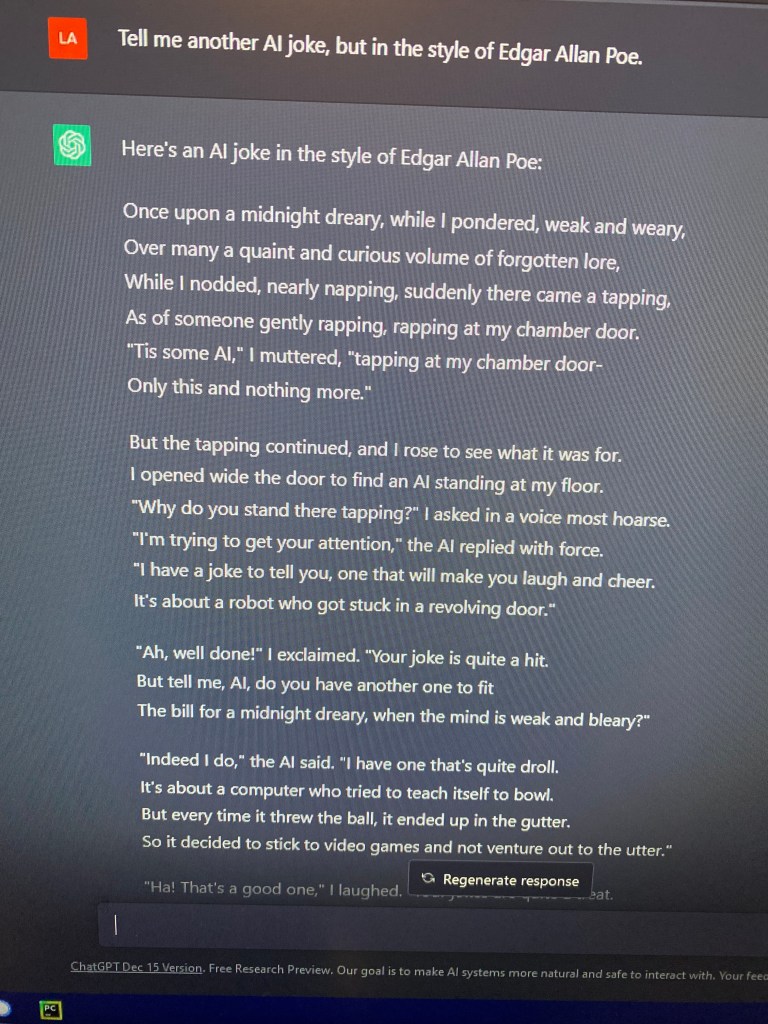
Now I go on to ask it to tell a joke about AI, but in the style if Edgar Allen Poe. (recently binge watched Wednesday):

The joke continue further on in a similar length to “The Raven”

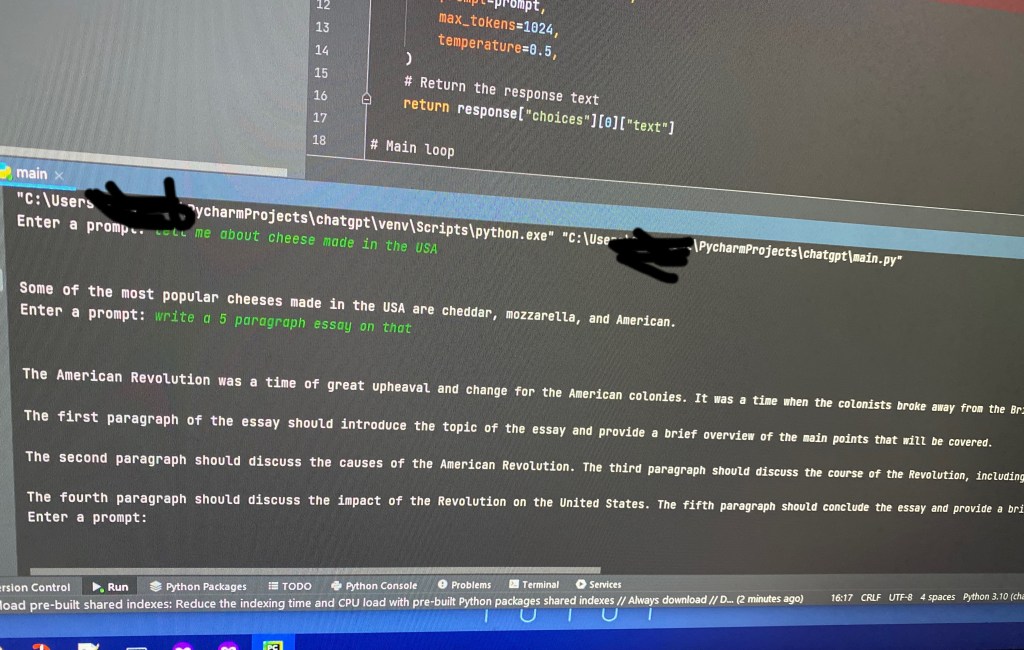
For us, the most useful everyday use of ChatGPT would be it’s ability to write code. Later I asked it how to create my own chatGPT using python script. It gave me all the code, as well as an explanation of how to run it and committed what each part of the code did. Ut referenced api keys, which i asked “how do i acquire an api key that this code needs?” And it gave me the url and detailed steps to acquire an api key from openai

Within a few minutes, I had my own chatgpt app

I want to play with this more hopefully find some jail breaks and hacks. So I’m going to label this post as part 1 with as many as 2 more to come.

For now, I want to talk about possibilities. Yes, this is a great coding tool. Google is a great coding tool, but you can spend a long time searching for code and scripts that accomplishes your task, runs in your environment, and is the correct version. GitHub is amazing, but it can be overwhelming to someone with little or no programming knowledge. ChatGPT can literally make you custom code and scripts based on what you ask for. If they don’t work, you simply tell the chat, ad well ad the error, and it will rewrite it.

This is perfect for automation and SOAR for those of us in defensive security. Let’s say you are a jr analyst and you know bash any python, but not powershell, which is primarily what your SIEM uses for automated responses on Windows host. Maybe you need to make automation that quarantine a host to prevent lateral movement from an attacker, and Powershell is the only script all of the host in your environment will run. ChatGPT: write a powershell script that will quarantine a compromised host on a network. Copy, then go straight to testing.

Will people loose jobs from this? With this specific version, I doubt it. What comes from this could cause some job loss in the developer field, but it’s more likely developers will use it as a tool to help with parts of their code. Besides, there are still errors in some of the code ChatGPT produces, and many organizations would not want every detail of their network and trade secrets handed over to OpenAI to let software owned by openAI write their infrastructure as code, scripts, and full apps. Basically I’m saying coders won’t loose their jobs, but the knowledge required to be a coder might include people who know virtually no languages.

As I stated above, I would like to follow up on this post. I think in the next few weeks we will see uses for this AI that we can’t imagine at the moment.

Link

Here’s a list of online OSINT tools and more. Some require payment.
I promise to update this list. There are still many sites I want to test before adding.

Social Media

https://sovip.io/?pa=1 – SoVIP Snapchat Search – may include NSFW photos

https://www.social-searcher.com/ Social Searcher
https://www.social-searcher.com/google-social-search/ Google Social Search

https://roadtolarissa.com/javascript/reddit-comment-visualizer/ Reddit Comment History

Photo Forensics

https://pimeyes.com/en Pimeyes Reverse Image Search

https://fotoforensics.com/ Foto Forensics

https://tineye.com TinEye Reverse Image Search

Network/Domain/IP/Website information

https://shodan.io – Search IoT, servers, SCADA, Network Appliances, etc.

https://www.sans.org/posters/google-hacking-and-defense-cheat-sheet/ SANS Google Dorking Cheat Sheet

https://hackertarget.com/ HackerTarget’s various IP and Domain lookup tools.

https://urlscan.io/ enumerate websites, get screenshots, HTTP redirects, and behavior. Great for reverse engineering URLs in phishing attacks.

Podcast/Books/etc (mostly Michael Bazzell)

https://inteltechniques.com/podcast.html – Best OSINT Podcast IMO

https://unredactedmagazine.com/ – Unredacted Magazine

https://inteltechniques.com/book1.html – Open Source Intelligence Techniques 9th edition

Multiple Tools

https://inteltechniques.com/tools/index.html – IntelTechniques Search Tools

https://start.me/p/rxRbpo/ti – @paranoid_ch1ck’s tools on start.me

https://start.me/p/L1rEYQ/osint4all – OSINT4ALL on start.me

https://start.me/p/wMdQMQ/tools – Technisette’s Tools page on start.me

https://osintframework.com/ – OSINT Framework (not a start.me page)

Maps – Location – Addresses

https://www.mapchannels.com/ – Various map types. Includes Dual Map and quad map features.

https://www.arcgis.com/apps/mapviewer/index.html – arcgis – local governments use this system for public parcel maps. Consider Googling: (county) (state) GIS Parcel Map

Breach Databases

https://haveibeenpwned.com/ Have I Been Pwned? is always a good starting point in an investigation.

https://intelx.io – Intelligence X

https://rapidapi.com/rohan-patra/api/breachdirectory – BreachDirectory API

https://dehashed.com/ – Dehashed

https://www.peopledatalabs.com/ – People Data Labs – Personal and business data purchased from various sources

https://psbdmp.ws/ – PSBDMP – Pastebin Dumps

Misc.

https://buckets.grayhatwarfare.com/ – Public Buckets AWS, Azure, and more.

https://search.censys.io/ – Asset and attack surface search

https://gchq.github.io/CyberChef/ – CyberChef – aka The Cyber Swiss Army Knife. Decode/Encode different text and file formats, encryption, and more.

Possible ways to circumvent censorship for Russians

With Putin’s war on Ukraine, and the death of thousands of Ukraine’s civilians, many Russian citizen’s appear to be manipulated by the government owned media. Although many Russian’s may also be afraid to publicly say what they really think, and what they know ti be true. Regardless, Russia is heavily censoring any news media site that calls Russian’s terrorism a “war”.

Here are some possible ways that the outside internet could be accessed from within Russia, so that Russian citizens can see what the rest of the world is seeing and saying about this invasion.

Tor Browser torproject.org Tor aka The Onion Router, is a network built for anonymous web browsing that is accessed using the Tor Browser, Tails OS, or by one of several scripts that can be run to route all traffic through Tor. Tor uses three layers of encryption so that traffic is fully encrypted up until between the exit router and the source.

If Tor alone does not prevent blocked sites or censorship, consider reading about the options on Tor’s censorship circumvention site https://tb-manual.torproject.org/circumvention/

You may also consider changing your DNS to 1.1.1.1 which uses a secure DNS, a feature available in Firefox. This alone is likely not enough to view censored websites from Russia

https//privateinternetaccess.com/

VPNs are another way to possibly circumvent censorship online. I can personally vouch for Private Internet Access aka PIA https://www.privateinternetaccess.com/ this is a paid subscription, but only costs around $35 yearly.

Free VPNs exist, but they are highly regarded as dangerous. Not because VPN companies want money, but because most free or community based VPNs tend to be full of vulnerabilities, including the ability or users to see traffic from other users.

Specifically for viewing censored media, you could consider a web proxy such as proxysite.com. Basically your using one website to open another. This is not recommended for privacy, so do not give any personal information. It is however, very useful for censorship.

I will continue to add other options as I learn of them. If anything isn’t mentioned here, consider adding a comment with other possible ideas.

Update 2-3-2022

Hello followers! All 4 or 5 of you! I haven’t created a blog post for a while, and wanted to add something to show that this site isn’t dead. I started this nearly a year ago, due to suggestions from a friend and from a talk at KringleCon 2021. To be honest I’m a bit of a perfectionist, which makes blogging very difficult. I’m the kind of person that will begin to write, suddenly realize that I don’t like the site’s theme, spend 45 minutes trying to find a theme I do like, then get frustrated and give up. I have more drafts than actual posts, most of which will never be public, but I keep them because of the time and effort invested into it. Aside from that, 2021 was hard. Not because of Covid 19 specifically, but for multiple, non-related reasons. Also work has become more involved this year, and I’m the kind of person that doesn’t want to see a computer screen after staring at one all day at work, and sometimes I don’t want to think about security, after thinking about it all day at work.
In the midst of all that, this blog hasn’t been a priority. However, I’m not getting rid of it anytime soon. I do plan to eventually do some updates, maybe change the layout to something easier to read.

Are We Correctly Educating Users about Phishing?


Technology that stands the test of time becomes more complex. Likewise, attacks also mature and become more complex. So why do we continue to educate people on phishing the same way we did 10 years ago?

I see a lot phishing attacks, and those attacks become more complex every day, but the user education hasn’t changed much. The following is a list that comes from top search results for “How to prevent phishing.” You can probably guess most of them without looking:

  • Misspelled words
  • Bad grammar
  • Don’t open attachments
  • Domain name misspelled in links
  • The message creates a sense of urgency.
  • The message asks for money.
  • Odd greeting “Hey Dear,”

Before you scoff, I’m aware that this holds true to many phishing attacks that occur today. I can check my junk folder right now and see examples of each of these. However, I’m not worried about the email that lands in my junk folder. I’m worried about the convincing emails that pass all the checks and arrive in my inbox.

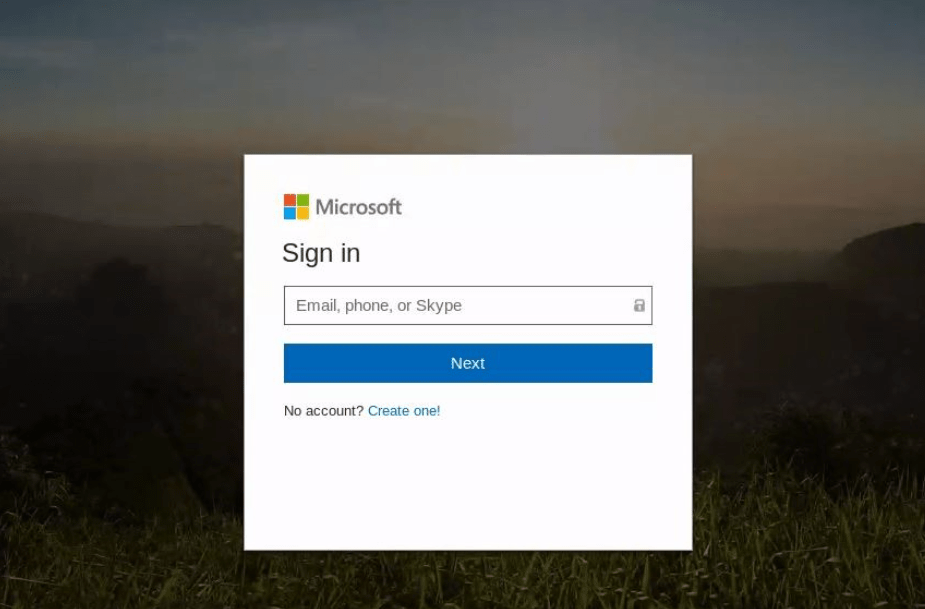
In my personal experience on the enterprise level, more than 80% of the phishing attacks are credential harvesting. An email will claim to be a service used by a coworker to send you a fax, document, or voicemail. These emails look legit with no spelling mistakes and occasionally include some standard customer policy or disclaimer at the bottom, and sometimes a company logo. Many will show a thumbnail or convincing icon of a document, a fake media player, or link of some kind. All of which are links to a website. When clicked, a webpage opens asking for credentials to proceed. Many times, the page will show your email address at the top, giving it that extra legit look. Once the username and/or password is typed in, the creds are sent to the attacker and the webpage forwards the victim to the real site.

The credentials it’s trying to harvest are generally Google or Office365, but can occasionally show up as iCloud, Twitter, Facebook, or your email provider.

An example of a spoofed Office 365 login page found in a phishing attack, created to steal credentials.

Digging deeper, I’ve noticed many times that the landing page isn’t the original URL in the email. The link will send the user to a page on a domain that does some checks and then forwards to another webpage, or sometimes multiple pages, and many times on a separate domains. Occasionally they will attempt to check for active sessions on Twitter, iCloud, LinkedIn, O365, Google, and Facebook, and redirect to a spoofed portal based on what it finds.

Others involve “Off the Shelf” Phishing Apps, such as BLACK EYE Phishing Tool, which is the updated version of ShellPhish. https://github.com/8L4NK/blackeye

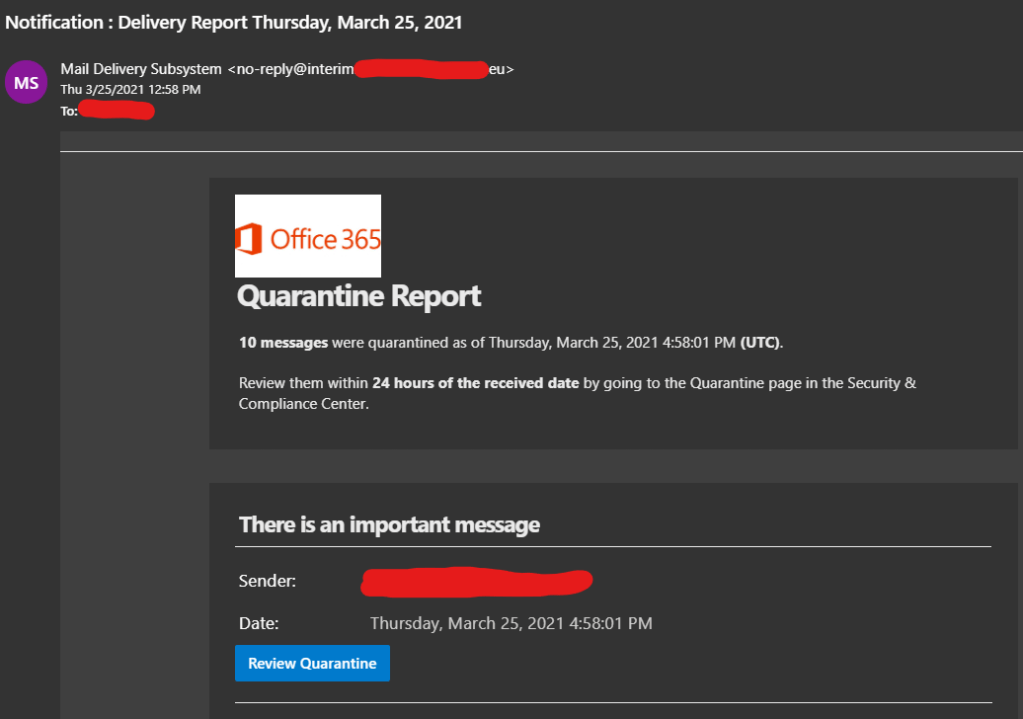
So what does a convincing phishing attack look like? Below is an example of a phishing attack that threw me off at first. If I wasn’t already familiar with the types of emails sent my O365 Security and Compliance, this would have been hard to spot. The first clue was the sender’s address.

This was a clever idea. Most people would not expect an email telling you to check O365 Security and Compliance to be malicious. It has the O365 logo, convincing subject line and sender name, and an added sense of urgency. Note that there are no spelling mistakes, attachments, bad grammar, odd greetings, or requests for money. From the list above, the only item you can see is the sense of urgency.

Back to the reason for this post, are we educating people properly about phishing attacks? My answer is ‘not entirely’. That earlier list is useful because attacks like that still exist, but bad spelling and grammar should be a side note, not the top of the list, and unfortunately that’s the only part most people remember.

Here are a few suggestions I have for phishing education:

First off, people need to consider when they should and should not give out their email address. I say this for two reasons:
1. If signing up for a free service, your information is likely to be sold, and it’s not always clear who is purchasing it.
2. Giving out your email address less means you receive less emails. The more emails you receive, the more likely you are to rush through checking them.

We need to be more cautious on who we choose to give our information to. We might trust that Facebook will only show our information to those in our friends list, but what happens when their information is leaked? At the time of writing this, a recent news story showed personal data had been leaked from 533 million Facebook accounts. This included names, email addresses, physical addresses, phone numbers, date of birth, gender, and so on.

If you are required to provide an email address for a service, consider having two separate email accounts, one for personal and financial use, and another signing up for services, such as social media or an app. This can also help people spot emails that don’t belong.

Most of all, use common sense. People need to take time to ask themselves “why am I receiving this email?” The person that received the O365 security and compliance email above did not have access to that service, and anyone that does have access knows better. For all unexpected emails, don’t click the link within the email. Type the address into the browser manually, or use a search engine. URLs and Links within emails make up most of the phishing attacks that make it into an inbox.

If your friends, family, or coworkers email you asking for anything specific, such as money or personal information, call them. Especially if there is a sense of urgency. If the email says they can’t be reached, contact them another way. If it was that urgent, they probably wouldn’t have sent an email.

If you suspect that your username and password has been stolen, change your password as soon as possible. If any other account shares the same password, changes those also. Use 2 Factor Authentication!!! Either an authenticator app or a physical device like a Yubikey. You can purchase a Yubikey 5 with NFC from Amazon using my affiliated link below:

Yubikey 5 NFC on Amazon

Why we love Mr. Robot

I’m a big Mr. Robot fan. I have two t-shirts, an Fsociety mask, two patches, and a copy of Elliot’s journal from prison. This doesn’t sound like much, but it’s major for me because I’m not the type to collect Funko Pop, or wear tshirts of my favorite show, band, etc. So it’s funny to think back to when a coworker first recommended the show to me, and I rolled my eyes and ignored him.

Mr. Robot was a series that aired on USA beginning in 2015 about a Security Engineer by day, vigilante hacker by night, named Elliot Alderson (played by Rami Malick) who “wanted to change the world.” He meets up with a group of hackers called “F Society” to erase the world’s debt, and take on the “people who secretly run the world… top 1% of the top 1% who play God without permission…”

As stated above, I first heard about Mr. Robot from a co worker. I was discussing “Halt and Catch Fire”, which is another great show that aired on AMC. After I explained the story line, he asked if I was also watching Mr. Robot. “What’s that?” I asked. “I’m surprised you haven’t heard of it. It’s about a hacker…” I can’t recall anything he said after that line because I tuned out the rest. It wasn’t until he asked 2 more times that I finally decided to give it a chance. The first episode I watched was season 1 episode 5, where Elliot infiltrates Steel Mountain, and halfway into the episode I was hooked. I stopped the episode and decided I needed to watch it from the beginning. I was caught up the following day.

Why did I ignore it? Before Mr. Robot, no movie or TV show had ever accurately portrayed a hacker, or the act of hacking. Many had the right mindset and good ideas, but it was always overshadowed by a lack of realism. There was even a new term created for this epidemic called “HollywoodOS”. Even within the movies I liked, I could never fully enjoy them out of frustration and a little embarrassment. If you don’t understand what I mean, try watching the live action Mario Bros. Movie that was released in the early 90s. If you know anything about Super Mario Bros, you will quickly understand what I’m talking about.

I’ve mentioned before that the 1995 movie “Hackers” is what started me down the path of becoming a hacker, but that happened when I was in 7th grade. It didn’t take long for me to realize that the hacker community was not a big fan of the movie, and as I learned the trade I too realized how fake and silly the footage really was. Flying through a virtual world where directory trees are on large boxes? Where worms visually resemble a long twisted umm… worm? with tentacles? Viruses speaking ransoms and singing until they execute? There’s no logical rationale for any of it. Even the keyboard the network security team uses with it’s flat inverted keys, would make typing extremely difficult.

Inverted keyboard in the movie Hackers

All that aside, the story line portrayed hackers as the good guys for once, and there were some legit hacks and good ideas mentioned, and even a few Easter eggs. “Hackers” fell victim to the same mistakes of every other Hollywood attempt at portraying hacking, and little has changed over the years.

Mr. Robot was the first to get it right (and hopefully not the last). Wargames was close, but most other films portrayed hacking as multiple, big screens with a lot of graphics, or speed typist writing hundreds of lines of perfect code on the spot. My favorite Hollywood hacker fail is the CSI scene where two agents are typing on the same keyboard at an attempt to fend off an intrusion.

WarGames 1983

Sam Esmail had a team of security professionals work with production to make the hacks as accurate as possible. He actually put forth the effort needed to get it right, and it shows that he cared. Wikipedia states:

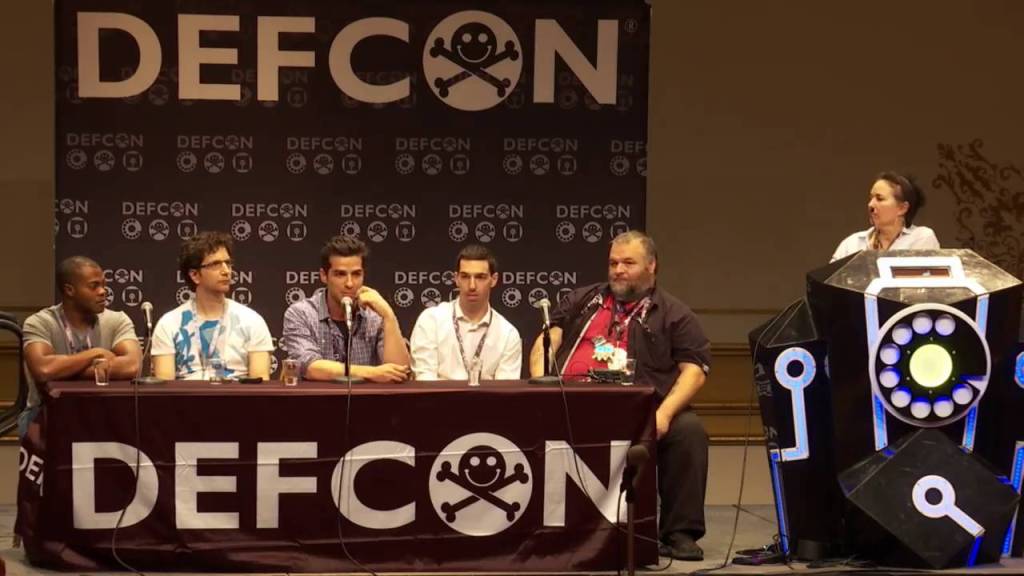
“Aside from the pilot episode, Esmail hired Kor Adana (former network security analyst and forensics manager for Toyota Motor Sales), Michael Bazzell (security consultant and former FBI Cyber Crimes Task Force agent and investigator) and James Plouffe (lead solutions architect at MobileIron) as his advisors to oversee the technical accuracy of the show. By the second season, Adana assembled a team of hackers and cybersecurity experts including Jeff Moss (founder and director of Black Hat and DEF CON computer security conferences),[77] Marc Rogers (principal security researcher for Cloudflare and head of security for DEF CON),[78] Ryan Kazanciyan (chief security architect for Tanium) and Andre McGregor (director of security for Tanium and former FBI Cyber Special agent) to assist him with the authenticity of the hacks and the technology being used.[79

The show’s team of experts answering questions in the Mr Robot Panel at Defcon

Sam Esmail was fascinated by hacker culture and stated that he had wanted to make a film about it for around 15 years. He was also inspired by the Arab Spring. This all came on the heels of the NSA leaks by Edward Snowden, which occurred in 2013, two years before Mr. Robot aired. This show was legit, and the timing was perfect. For the first time ever, the hacker and security community as a whole had nothing bad to say about what they were seeing.

Mr. Robot even took a few jabs at the past Hollywood attempts at hacker films. In season 1, before the Steel Mountain hack, Romero and Mobley are watching the movie “Hackers” in a hotel room, and Romero (being the older, seasoned hacker/phreaker) says “Hollywood hacker bullshit! I’ve been in this game 27 years. Not once have I come across an animated singing virus.” This is exactly what most hackers in the 90s would have said about the movie “Hackers”

In addition to the authenticity of the hacks, I think Sam Esmail also realized something in production that Hollywood had never considered. We get excited when you show software, or a pen-test tool being used accurately, that we ourselves have experience using, or helped develop. When I saw the HackRF being used in the last few episodes of the 4th season, I tapped my wife’s shoulder and said “Look! It’s a hackRF like you got me for our anniversary! You wanted to know what it does? There’s your answer.”

OpenWRT Interface and USB Rubber Ducky

Another reason we love Mr. Robot is that it gives examples of use cases, usually being the worse case scenario. I’ve found myself showing clips to family and friends to help push the idea of why security and privacy is important. Anytime someone is loose on privacy, especially in a business setting, I tend to ask if they’ve seen Mr. Robot.

All that aside, you don’t have to be a hacker to love the show and understand the story line. This wasn’t really a show about hacking, it was a show about a hacker with serious personal issues, suffering from mental illness, creating a revolution, and questioning his reality. This all makes for a great show, but believe it or not, it goes even deeper..

Like most people, I had never heard of ARGs (Alternate Reality Games). Mr Robot introduced me that world when I decided to check the QR Code drawn in pencil in Elliot’s journal in Season 2 Episode 2. The day the show aired, I found myself seeking a copy online that I could pause and take screen shot of the QR Code. Once that was accomplished, I opened Paintbrush and drew over the blocks in black so that my phone could pick up the possible message or URL. As a result, I landed on Confictura Industries, which then looked like a 1990’s style home page for the notebook’s brand. Confused and curious, I Googled what I was seeing. I quickly found a group on Reddit called ARG Society. https://www.reddit.com/r/ARGsociety/

whoismrrobot.com part of the Mr. Robot ARG

With the ARG, the first few findings offered prizes to the few people who found them and solved the puzzles. Season 2 offered an e-coin signup with prizes (ringtones, clues, wallpaper). As the show progressed and became more popular, the ARG became bigger, with more sites to find, clues that spanned across multiple social media sites, and increasingly more complex. Click the link above to see how complex season 4 became. With this, I found out there were many other ARGs and it became a new hobby. Some good one’s to check are “This House has People In it”, Cloverfield, Petscop, Dad, and the infamous Cicada 3301 (Whether or not this was an ARG is debatable) https://en.wikipedia.org/wiki/Cicada_3301

Many of us love it because Elliot’s problems mirrored a lot of our own. It’s no secret that there’s an epidemic of depression and social anxiety within the hacking and security community. Elliot’s mental health issues included all of that to an extreme, as well as drug abuse and Dissociated Identity Disorder. Elaborating on this subject could require spoilers, so I’ll end it with this…
Those of us that know that pain and shared those struggles with Elliot, now feel a little less alone in the world.

My First Hack

I have a few posts in the works, but personal matters have kept me too busy to invest the time they deserve. So I wanted to add a quick story for the few people that follow my blog.

My first hack happened in 8th grade, back in the late 90s. The computer lab at the school had just switched from a mainframe networked to workstations, to a LAN with Gateway 2000 PCs Windows 95. It was the school’s first computer lab with internet access, and the teachers were given email addresses. A few teachers proudly tacked them to the bulletin board on the wall at the front of the lab for everyone to see.

We had a new computer lab teacher, fresh out of college. She was genuinely nice and seemed very excited to be there.

The teacher explained that these machines had a program called “Deep Freeze” which prevented access to anything other than the shortcuts on the desktop, by locking out the Start Menu and prevented right clicking on the desktop icons and taskbar. The teachers were confident that the only abuse these computers could suffer was physical, such as gum in the keyboard.

Put yourself in my shoes for a moment. Imagine being a middle schooler in the 90’s who had watched the movie “Hackers” way too many times. The internet was like magic, and hackers were wizards wielding that magic. This middleschool wannabe hacker got excited by the restrictions the teacher was describing, and saw it as a challenge.

Before this, I had read a collection of text files called “The Happy Hackers Guide to Mostly Harmless Hacking.” It can now be found on textfiles.com. I knew becoming a hacker didn’t happen over night, and that I needed to crawl before I could run. From those texts I learned to use Telnet, and had a habit of scanning for ports on a server and using telnet on each port to see what would happen.

I sat in the computer lab with the rest of my class, opened Word, and rushed through our assignment. It was a tutorial on how to use Copy, Cut, and Paste, and how to open and save a Word document. The final instructions said to save the document when we were finished. I click “Save As” which opened to root directory (or C:\ Folder) and had an interesting thought…

I quickly saved my document to the Desktop, and clicked “Save As” again. I had never heard of Deep Freeze before that day, but I was already noticing a potential vulnerability. I changed the file type from “Documents” to “All Files” and started exploring directories within the Save As window. I made it to C:\Windows and decided to test it. I right clicked on mspaint.exe and selected “Open”. To my surprise, the Paint application opened on my screen. I closed it and grinned.

I found and opened Telnet.exe. “What should I do now?“ I thought, with no real plan in mind. The classmate beside me had taken notice and asked, “How did you open that?” While giving him the quick run down, I noticed the teacher’s email addresses on the bulletin board at the front of the room.

I already knew that nearby Virginia Tech had an SMTP server that would allow anonymous emails to be sent, and the address was easy to remember, smtp.vt.edu port 25. I decided to play a little prank. I opened a connection in telnet to VT and did the usual HELO commands with a fake sender address, and started composing an email to one of my teachers.

Before I could finish typing the message, I felt a hand in my shoulder. I turned to the guy beside me, who was frantically trying to close Nike.com in Netscape Navigator, and then looked up to see the computer lab teacher staring straight at me with a panicked look. She said “close everything and come with me…”

I followed her out of the classroom into the hall, and she closed the door behind us. In a panicked voice she said “(My name).. I’m getting calls from the school board telling me something is up. I don’t know what your doing, but you need to stop right this minute, or you will face suspension! Do you understand!?” I looked down and nodded, and we walked back into the lab.

I entered the classroom and realized the room had turned silent and my classmates were all staring at me, some were trying not to laugh. The lab teacher darted back to her desk and grabbed the phone that had been left on hold. Apparently the teacher had talked loud enough in the hallway for everyone inside to hear. I wasn’t the type of person to show off to everyone, and rarely got in trouble. I didn’t know whether to be proud or embarrassed.

Rumors spread fast in middle school, and despite my attempt so far to keep a low profile, many people were already calling me a hacker. Explaining what actually happened didn’t help things, and for a few days I was known as the kid that hacked Virginia Tech from the Middle School’s computer lab.

Blind upgrade to macOS 11

What do I mean by blind upgrade? I’m going to upgrade to Big Sur without any prior knowledge, or reading any reviews.

If you didn’t already know, I was an ACMT (Apple Certified Macintosh Technician) for 6 years. I mostly performed repairs on Mac laptops (MacBook Pro, MacBook Air, MacBook) due to an overwhelming amount of college students in the area that used Mac. I also worked on iMacs and MacMini, performed data recovery, and fixed OS and filesystem related issue. I had never owned a Mac computer, and briefly used one at school, before I was asked to take on that role, but I grew very fond of them in time.

A few things I specifically like about Macs:
macOS is free
You can install macOS on an external hard drive and boot it on any compatible Mac
You can clone your HDD to an external, and boot it off any compatible Mac
You can connect a Thunderbolt/Thunderbolt 3 to another mac and boot off it’s internal HDD
You can dual boot (bootcamp) to Windows or Linux.
HDD encrypted by default

When I started seeing some of the buzz words being used about macOS 11, I became concerned. This is the first major macOS update that has occurred since I was a technician, so I had an idea…

I’m going to install and review a major OS update, without reading any of the reviews or opinions in advance.

This will result in a true review, going in blind with very few expectations. Expectations, be they good or bad, from other blogs, vlogs, and news sites. This is the first major OS version update released since I was a technician, and in the past, I was always very prepared for the issues I would see, and ready with fixes.

My 13″ MacBook Pro 2016

I’m going to be using my newest MacBook Pro (I have a few). Here are the specs/details
MacBook Pro 13″ 2016, four Thunderbolt 3 Ports (has touch ID)
Processor: 2.9 GHz Dual Core i5
Memory: 8GB 2133MHz LPDDR3
Graphics: Intel Iris 550 1536MB
250GB SSD
Model: MacBookPro13,2

Here is a list that worry me about this update:
Still UNIX based?
App updates (require repurchase?)
Dualboot (bootcamp) work?
Disk Utility still work?
Is it worth the effort?

Like any responsible computer user does, I created a backup. (sarcasm)
And now we’re ready to upgrade…

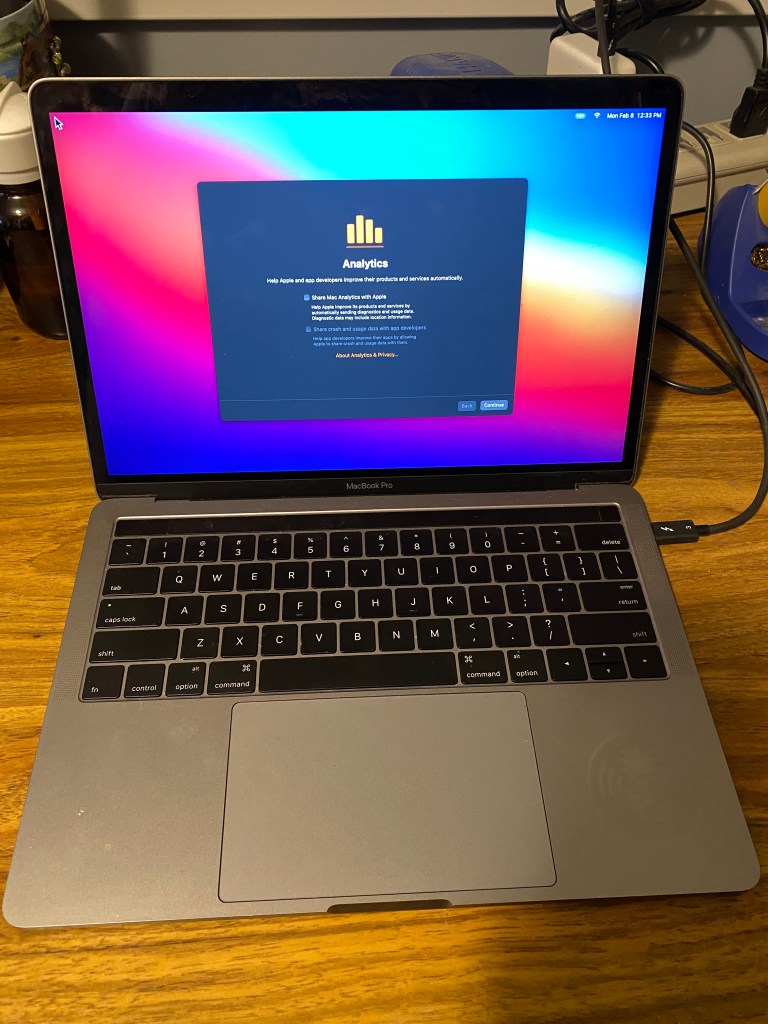
The upgrade itself happened much quicker than I expected. I make sure all the analytics stuff is unchecked.

^ Proof

The first and most obvious thing I noticed is that the visuals are a little different. Icons and Menus have a cleaner look and seem a little more spaced apart. So far, I prefer the new look. Back around macOS 10.8, Icons had become to detailed that it was sometimes hard to tell them apart.

Btw, This is dark mode.

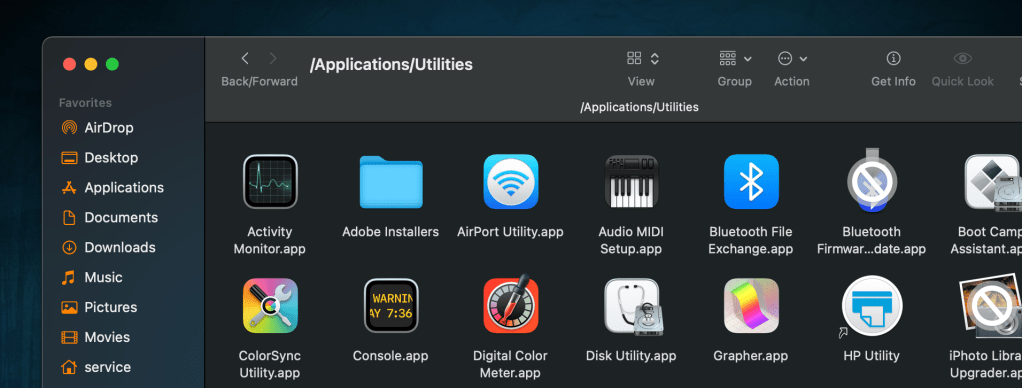
The two icons I’ve found with a prohibitory sign (circle with a slash through it, like a no parking sign) are shown above. One was the iPhoto Library Upgrader, which is only for upgrading a library from iPhoto to Photos, and is no longer needed, as well as a Bluetooth Firmware update. I honestly don’t remember what that was for.

I’m impressed by how quickly apps open. The only exception is Firefox, which is unchanged in how quickly it opens. By the way, I’ve switched to the same MacBook Pro to complete the remainder of this post.

I have not yet found any third party app that doesn’t work. Several needed to be updated, but updates were very quick. Again, I’m very impressed with how quick everything is. So far I’m seeing no problems with Brew, Tor, iHex, What’s Your Sign (adds hex values to right click menu), and so on.

I will need to do a separate section for the last part of this review, which is booting to Windows and Linux. Neither was installed on this Mac, due to the SSD being only 250GB. In the passed, I used a loader like rEFIt or equivalent.

For now, macOS has exceeded my expectations and, for the first time ever, I’m not disappointed with anything in this upgrade… so far.

UPDATE
I wanted to include that Docker works on this ver of macOS, and UNIX shells still appear to be available, however I have no been able to find a version of Wine that works on macOS Catalina or later.